
问题
When I try to build a project twice in successon, i get the following error
Error 2 Unable to copy file "obj\x86\Release\iFileUploader.exe"
to "bin\Release\iFileUploader.exe". The process cannot access the
file 'bin\Release\iFileUploader.exe' because it is being used by another process.
If I close Visual Studio and reopen it, I can compile it again but only once.
I have my projects hosted on a Windows network share. The server runs Windows 2008 R2 and Im on a Windows 7 machine and Ive tried setting everyone full control on the share and the folder permission, to no avail.
Ive even run the Unlocker program and checked the Windows Share & Storage Manager to see if anything is using it and nothing is! I cant delete the file when this happens either until I close VS.
Is there a setting I am missing in Visual Studio?!
UPDATE
Have removed all antivirus/antispam, disabled firewall.. so zero security.
Have disabled "Enable the Visual Studio hosting process"
Visual Studio is some how the colprupt with not releasing the handle
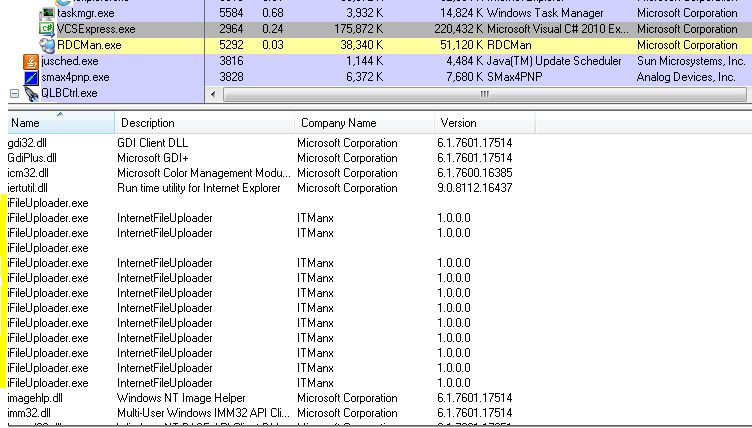
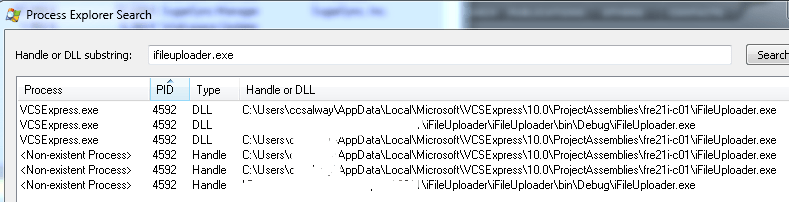
UPDATE
Another thread that has exactly the same problem but from years ago !!
Destroy process-less console windows left by Visual Studio debug sessions
UPDATE
I copied the files locally, and that didnt work. So I created a new project and then copied all the code in to the new project and now its working (with the files stored locally)
回答1:
check your antivirus program is using it or not.
Alternatively use Process Explorer and find for the string - "iFileUploader.exe" and see who's using it. You can easily get the handle and close it.
回答2:
Several points:
- Check if you don't have a process
iFileUploader.exealready running in the Windows Task Manager. - Check that nobody is not running a project that could use
iFileUploader.exe.
回答3:
Christian even if you are have your Stream in a using(){} do not declare a new variable of StreamReader for example do not do this
using(StreamReader streamReade = new StreamReader)
{
  ..... // if you do you will run into that stream being locked
}
//Declare the StreamReader variable out side of the using and then within the using do something like this.

StreamReader streamReader = null
using(streamReader = new StreamReader()
{

}
回答4:
Make sure that where you have created an instance of the StreamReader or StreamWriter that you have closed the stream.
For example I would create at the application level a StreamReader / StreamWriter instance and set it to null
Class SomeClass
{
  public StreamWriter streamwrtFileToCreate = null;
  public FileStream fstreamFileStream = null
  public SomeMethod(string FileName, string FilePath)
  {
    FileStream fstreamFileStream = new FileStream(@FileName + @FilePath, FileMode.Create);
    streamwrtFileToCreate = new StreamWriter(fstreamUpdateRpt);
    streamwrtUpdateRpt.AutoFlush = true;
  }
}
Also it would help if you post the exact example of code that you are using when you create the FileStream Instance
回答5:
I had this issue in VS 2012 windows 7. Root cause is Avast Antivirus.
Fix is disable Avast whenever needed to work on C++ console applications
(or)
->Go to Avast Settings
->Active Protection
->File System Shield (Customize)
->uncheck Scan programs when executing
来源:https://stackoverflow.com/questions/7995493/visual-studio-cannot-build-a-simple-project-more-than-once