
问题
I tried implementing a simple web service into an asp.net application using the tutorial found here: http://dotnetslackers.com/articles/ajax/JSON-EnabledWCFServicesInASPNET35.aspx#1301 and http://dotnetslackers.com/articles/ajax/Using-jQuery-with-ASP-NET.aspx
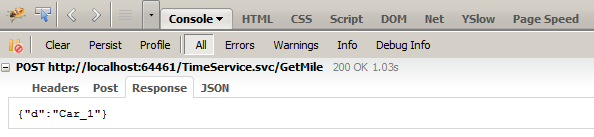
The problem is, my data is being returned as seen in this screen shot (according to firebug):
    $("#btnGet").click(function () {

        $.ajax({
            type: "POST",
            contentType: "application/json; charset=utf-8",
            url: "TimeService.svc/GetCar",
            data: "{}",
            dataType: "json",
            success: function (data) {
                alert(data.d);
            }
        });

    });

});
My Web Service method looks like this:
[OperationContract]
public string GetCar()
{
    using (var sqlc = new SqlConnection(@"Data Source=.\SQLEXPRESS;AttachDbFilename=|DataDirectory|\CarTracker.mdf;Integrated Security=True;Connect Timeout=30;User Instance=True"))
    {
        sqlc.Open();
        var cmd = sqlc.CreateCommand();
        cmd.CommandText = "SELECT CarID, CarName FROM tblCars";
        using (var reader = cmd.ExecuteReader())
        {
            string sCar = "";
            int testcount = 1;
            for (int i = 0; i < testcount; i++)
            {
                reader.Read();
                sCar += reader["CarName"].ToString();
            }


            return sCar; // Car_1
        }
    }
}
So my questions are:
Where does the 'd' in firebug come from?
How do I build 'JSON-style' "strings" based on my db to return back to the jquery ajax function?
Ideally I would wantthe jquery ajax data to look something like this:
{"TotalCars": x, "CarList":[{"CarName":"x1", "CarID":"id1"},{"CarName":"x2", "CarID":"id2"}]}
So then with jquery I can do things like alert(data.TotalCars); and all that sort of stuff.
Please bear in mind that I'm -very- new to this so I appreciate any help you can provide. Thank you in advance! <3
回答1:
The "d" is used by the webservice framework to ensure that a naked array is never returned by a service. This is done to work around a potential cross-site Javascript exploit.
You want to create classes that describe your data contract, for example:
[DataContract]
public class CarCollection {
    [DataMember]
    public int TotalCars { get { return CarList.Count; }}
    [DataMember]
    public List<Car> CarList { get; set; }
}

[DataContract]
public class Car {
    [DataMember]
    public string CarName { get; set; }
    [DataMember]
    public string CarId { get; set; }
}
Then you would build up your return value using those classes. You can also tell WCF to accept the HTTP GET method and JSON serialization for the response with the WebGet attribute:
[OperationContract]
[WebGet(ResponseFormat=WebMessageFormat.Json)]
public string GetCar()
{
    // You will probably build this up from your databas
    var cars = new CarCollection { CarList = new List<Car>() {
        new Car { CarName = "x1", CarId = "id1" },
        new Car { CarName = "x2", CarId = "id2" },
        new Car { CarName = "x3", CarId = "id3" },
    }};

    return cars;
}
WCF will automatically serialize your object graph into JSON and send it back to the client.
You can also then use the simplified JQuery method get:
$("#btnGet").click(function () {
    $.get("TimeService.svc/GetCar", function(data){
        alert(data);
    });
});
回答2:
1) The 'd' in the JSON response is put in by ASP.Net to prevent the service from returning a valid javascript statement so that it cannot be parsed and instantiated as a new object in javascript to prevent cross-site scripting attacks.
2) The webservice will automatically turn your .Net objects into JSON if you annotate the web method with [ScriptMethod(UseHttpGet=true, ResponseFormat=ResponseFormat.Json)]. Using the CarCollection by @joshperry, try:
[WebMethod()]
[ScriptMethod(UseHttpGet=true, ResponseFormat=ResponseFormat.Json)]
public CarCollection GetCars()
{
    CarCollection carResult = new CarCollection();
    ...
    return carResult;
}
来源:https://stackoverflow.com/questions/4383098/creating-json-return-strings-from-a-webservice-for-use-with-jquery-ajax