
问题
whenever i try to run program for example,
if i have to run "frmphonebook" so in
Application.Run(new frmphonebook());
I typed but when i run it it run another form, and it happens to each and every form and it is displaying output as
The thread 'vshost.RunParkingWindow' (0x63c) has exited with code 0 (0x0).

The thread '<No Name>' (0xb24) has exited with code 0 (0x0).
how to solve this ?
回答1:
You can give your threads a name it would also help you in your debugging... But in many apps threads are created implicitly and you have no control over the name. So that is not an error message. Code 0 means everything went according to plan. Any non-zero code usually indicates an error.
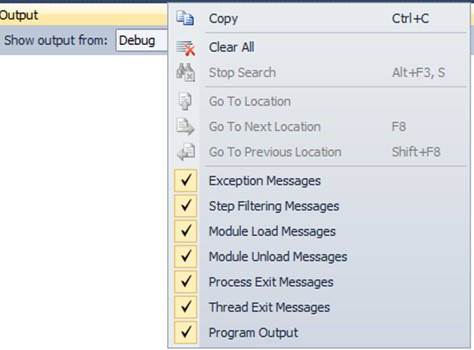
edit: You can also disable the display of these messages, when debugging, do right click on output, and choose what do you want see.
回答2:
If a thread has exited with code 0 it ran successfully. On Codeproject is a Beginners-Guide-to-Threading This article on threading might also be helpfull. This question on so could also be of use. A list of System Error Codes
回答3:
One of the things you will learn about using the Debugger is that you will see what we might call "the soft white underbelly" (an allusion to alligators' anatomy) of the system: all kinds of DLLs being loaded and unloaded, the somewhat complex arrangement of "helper" threads being started and stopped... etc.
It can be distracting to a less experienced user, to see all of these messages. However, over time, you will come to understand that the Debugger is simply being truthful and verbose. The details it is displaying for you might not really be relevant to your debugging process, but it cannot "know" that; it is only displaying factual information, and you have to sort out what is relevant and what is not.
As for Windows Forms applications, I have myself noticed that there seem to be several "helper" threads, typically with no name, or (as is frequently seen by me when debugging), they are named things like "vshost.RunParkingWindow". Typically, you have to trust that the system is creating threads on your behalf, in addition to any threads you might create yourself. As others have suggested, give your own threads meaningful names so you can tell them apart from the system's threads.
You can get further insight into the multithreaded structure of your Windows Forms app by putting a breakpoint somewhere in your UI update code, and when it hits, use Debug/Windows/Threads to bring up a view of all the threads running in your process space. You'll be quite surprised, I think, by how many there are! Try creating and .Show()-ing several forms in your app, one by one. I think you'll see that each .Show() operation creates a new window, and with it, several supporting threads for that window.
You may also see messages in the debug window such as the following: "A first chance exception of type 'System.ObjectDisposedException' occurred in System.Windows.Forms.dll". Many times there are system exception handlers that perform a reasonable default action on your behalf. This message appearing without a break in the debugger indicates that some default handler took care of this exception for you.
The system support for something like a Windows forms application is somewhat complicated, to make YOUR implementation easier and simpler. When you run the debugger, you get to see some of these details. Over time, you will learn what is "usual" and what is indicative of a problem.
回答4:
Check to see if there are some files in your web app that have been rendered inaccessible. For my case my chart control created a text file which was read only and it threw an exception. Deleted the file and the folders and voila
回答5:
i found your solution i think....i the visual studio go to project >properties >linker >system look for the Subsystem line and click the down arrow and change to Console(....words....).
it worked for me !! ENJOY"
来源:https://stackoverflow.com/questions/14575010/the-thread-no-name-0xb24-has-exited-with-code-0-0x0