
问题
I added the bin directory of the VS2010 (not SP1) C++ compiler to my PATH variable on Windows XP. When i try to run it, it tells me that a DLL was not found.
I added this line to my PATH:
C:\Program Files\Microsoft Visual Studio 10.0\VC\bin;
Update: it still fails when I cd to the bin directory above, and then run the compiler
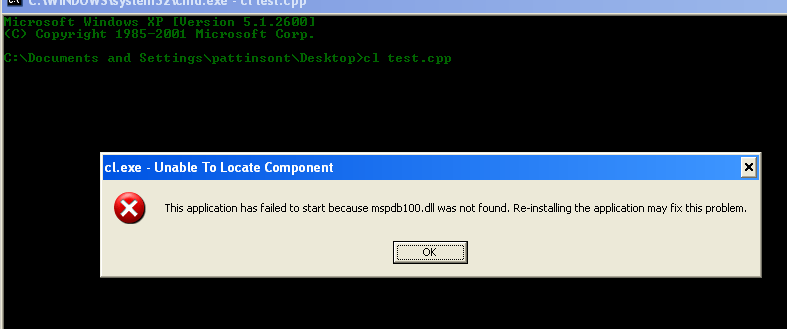
Can you help me out?
回答1:
Run the VS command prompt shortcut or the batch file it points to, such as:
"C:\Program Files (x86)\Microsoft Visual Studio 10.0\VC\vcvarsall.bat" x86
to set up an appropriate environment including the path.
By the way, mspdb100.dll lives in C:\Program Files\Microsoft Visual Studio 10.0\Common7\IDE. But run the shortcut/batch file anyway - it does more than set up the correct path.
回答2:
add Microsoft Visual Studio 10.0\Common7\IDE to your Path variable, than close cmd prompt and open it. now it will work.
回答3:
Running the VS command prompt takes care of setting up the environment. Also, ensure that you are running the command prompt as an admin.
回答4:
Installing Visual Studio 2010 SP1 C++ Compiler Setup fixed this issue for me. Visual Studio 2010 SP1 C++ Compiler install
回答5:
I faced the same issue when I tried to run a 32 bit exe I built, on a 64 bit machine.
"mspdb100.dll couldn't be found by cl.exe "
Visual Studio 2010(the version I currently use) builds a 32 bit exe by Default.To create a 64 bit executable, just change the setting from Win32 to x64 in the dropdown box at the top of VS and build.This will build for you a 64 bit executable and solve your problem.
来源:https://stackoverflow.com/questions/6476607/vc-cl-exe-dll-not-found