
问题
I want to learn how to create a symmetric matrix in VBA. For example in the first step I want to choose Range("C3:I3") then copy to the Range("B4:B10"). In the second stage it should choose Range("D4:I4") then copy to the Range("C5:C10"). It should go on like that.
回答1:
I have some code to do it. Your selected cell must be within the range of numbers.
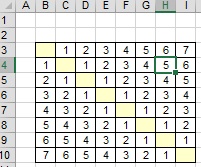
1. If the diagonal line is empty.
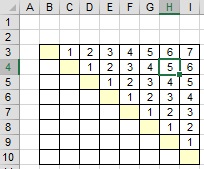 ►
► 
The code:
Sub making_symmetric_matrix()

Dim i As Long, j As Long
Dim rng As Range
Set rng = Selection.CurrentRegion
Dim rngStart As Range
Set rngStart = Cells(rng.Row, rng.Column - 1)

For i = 1 To rng.Rows.Count
    For j = i To rng.Columns.Count
        rngStart.Offset(j, i - 1).Value = rngStart.Offset(i - 1, j).Value
    Next
Next

End Sub
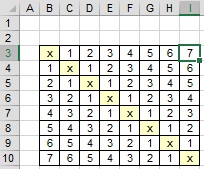
2. If the diagonal line is not empty.
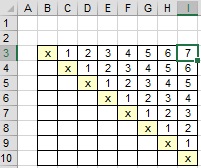 ►
► 
The code:
Sub making_symmetric_matrix2()

Dim i As Long, j As Long
Dim rng As Range
Set rng = Selection.CurrentRegion
Dim rngStart As Range
Set rngStart = Cells(rng.Row, rng.Column)

For i = 1 To rng.Rows.Count
    For j = i To rng.Columns.Count
        rngStart.Offset(j - 1, i - 1).Value = rngStart.Offset(i - 1, j - 1).Value
    Next
Next

End Sub
回答2:
You don't need VBA to do that. Select the cells and copy them. Select the top cell of the target range, use Paste Special and tick the box for "Transpose".
If you really need VBA to do this, you definitely don't need a loop as suggested in the other post. Just use the transpose option in the VBA code. For a large data set this will be a lot faster than looping through each cell.
    Range("C3:I3").Copy
    Range("B4").PasteSpecial Paste:=xlPasteAll, Operation:=xlNone, SkipBlanks:= _
        False, Transpose:=True
来源:https://stackoverflow.com/questions/30138339/creating-a-symmetric-matrix