
问题
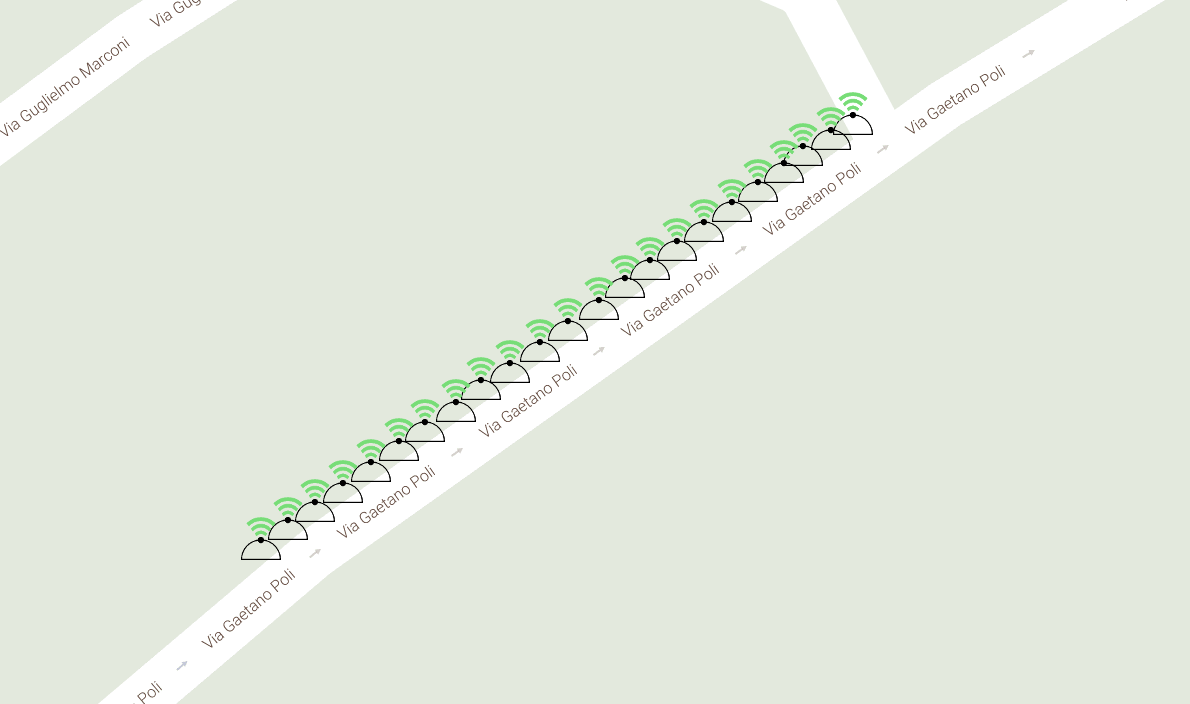 The symbols on the map are custom markers that I added to the map thanks to Google API.
To set their position, I use some coords stored in my database.
I want to change it with some rectangles like this:
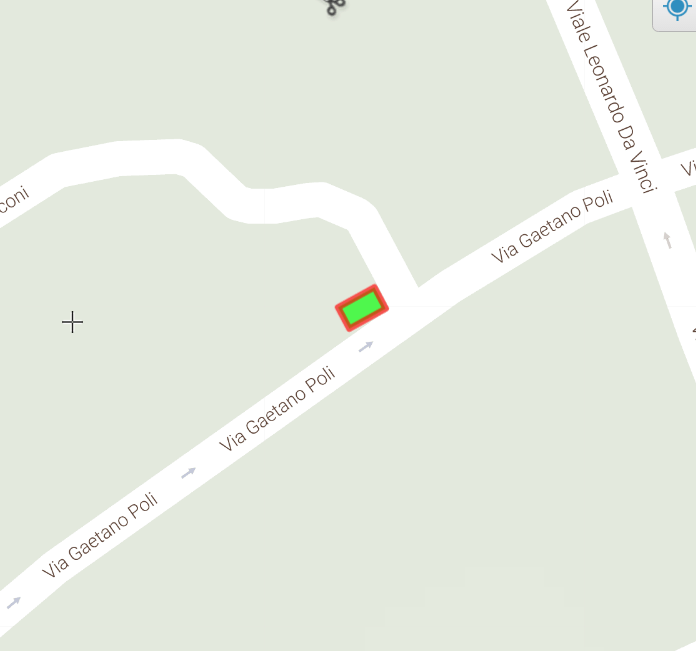
I can't use one unique "sample rectangle" to repeat, because it will not follow the road orientation.
This is my code (PHP/JavaScript).
<?php
$array_sensori = array();
$array_sensori = SensoreDAO::readArrayAllSensori($_SESSION['id_comune'], 0; ?>
   <script>
function initMap() {
    var map = new google.maps.Map(document.getElementById('map'), {
    zoom: 20,
    mapTypeId: 'terrain',
    mapTypeControl: false,
    styles: [{featureType: "poi", elementType: "labels", stylers: [{ visibility: "off" }]}, {featureType: "landscape", stylers: [{ visibility: "simplified"}]}],
    streetViewControl: false,
    center: segn
});
<?php /*
var marker = new google.maps.Marker({
    position: segn,
    map: map
}); */
?>
<?php
$i = 1;
$sensore = new Sensore();

foreach ($array_sensori as $sensore){
    echo 'var contentString'.$i.' = \'<div id="content">\'+
                        \'<h1 id="firstHeading" class="firstHeading">Sensore '.$sensore->getIdSens().'</h1>\'+
                        \'<div id="bodyContent">\'+
                        \'<p>Strada: '.StradaDAO::readStrada($sensore->getIdStrada()).'<br>\'+
                        \'Comune: '.ComuneDAO::readComune($sensore->getIdComune()).'</p>\'+
                        \'</div></div>\'
    ';

    $cambio_stato = new CambioStato();

    try{
        $cambio_stato = CambioStatoDAO::readLastById($sensore->getIdSens());
    }catch (DaoException $e){
        //echo "Caught LoginException ('{$e->getMessage()}')<br>{$e}<br>";
        $cambio_stato->setStato(0);
    }

    switch ($cambio_stato->getStato()){
        case 1:
            $ico ='Ico_Sensori_Occupato.png';
            break;
        case 0:
            $ico ='Ico_Sensori_Libero.png';
            break;
        }

    echo 'var infowindow'.$i.' = new google.maps.InfoWindow({
            content: contentString'.$i.'
            });
        var prev_infowindow =false;

        var icon_source =\'../main/images/'.$ico.'\';

        var marker'.$i.' = new google.maps.Marker({
            position: {lat: '.$sensore->getLatitudine().', lng: '.$sensore->getLongitudine().'},
            map: map,
            icon: icon_source,
            });


        marker'.$i.'.addListener(\'click\', function() {
            if( prev_infowindow ) {
                prev_infowindow.close();
            }

            prev_infowindow = infowindow'.$i.';
            infowindow'.$i.'.open(map, marker'.$i.');

            if (marker'.$i.'.getAnimation() !== null) {
                 marker'.$i.'.setAnimation(null);
            } else {
                 marker'.$i.'.setAnimation(google.maps.Animation.BOUNCE);
            }

            setTimeout(function () {marker'.$i.'.setAnimation(null); }, 3000);
        });

    ';
    $i++;
}?>
}
</script>
Explanation of my code.
- I take from the DB an array with my elements,their coords and some info. (They are objects of a class "Sensore" )
- Than I initialize the map and for each element of the array I set a custom marker.
- CambioStato is to read the state of these sensors and based on it, I choose a different icon for the marker through the switch.
How can I achieve my requirements?
I tried to draw polylines. This fails unless I can change the shape of the line. i.e. square and with different colors borders.
I tried to draw rectangles. This failed because I have a lot of sensor and to draw it with Google API I need the coordinates of the four vertices.
回答1:
this is the solution that I found to my problem. "image map".
function initMap() {
    var map = new google.maps.Map(document.getElementById('map'), {
    zoom: 19,
    mapTypeId: 'terrain',
    mapTypeControl: false,
    styles: [{featureType: "poi", elementType: "labels", stylers: [{ visibility: "off" }]}, {featureType: "landscape", stylers: [{ visibility: "simplified"}]}],
    streetViewControl: false,
    center: segn
});

var iconSymbol1 = {
        path: 'M 0 0 L 40 0 L 40 60 L 0 60 Z',
        anchor: new google.maps.Point(0, 0),
        scale: 0.35,
        strokeColor: '#000000',
        strokeWeight: 1,
        strokeOpacity: 1,
        fillColor: 'steelblue',
        fillOpacity: 0.8,
    };
var iconSymbol2 = {
        path: 'M 0 0 L 40 0 L 40 60 L 0 60 Z',
        anchor: new google.maps.Point(0, 0),
        scale: 0.36,
        strokeColor: '#000000',
        strokeWeight: 1,
        strokeOpacity: 1,
        fillColor: '#FFFFFF',
        fillOpacity: 0.8,
    };
<?php
//Reading all polyline paths (on which I'll draw SVG rectangle symbols) associated to the 'comune'
$polyline_array = array();
$polyline_array = PolyLinePathDAO::readArrayAllPolylinePath($id_comune);
$array_sensori = array();
$array_sensori = SensoreDAO::readArrayAllSensori($id_comune, $polyline_array[0]->getIdStrada());
$indice_path = 0; //I need to have count of the polylines number
$indice_sensore = 0;
$last_id_strada = $polyline_array[0]->getIdStrada();

foreach ($polyline_array as $polyline){
    //if the polyline refers to another street, I have to read the sensors of that street and restart $indice_sensore
    if($polyline->getIdStrada() != $last_id_strada ){
        $array_sensori = SensoreDAO::readArrayAllSensori($id_comune, $polyline->getIdStrada());
        $indice_sensore = 0;
    }

    //calculating the offset for each rectangle
    $offset_lat = ($polyline->getEndLat() - $polyline->getStartLat())/$polyline->getNumSensori();
    $offset_lon = ($polyline->getEndLon() - $polyline->getStartLon())/$polyline->getNumSensori();

    $last_path_lat = $polyline->getStartLat();
    $last_path_lon = $polyline->getStartLon();

    //starting calculating paths for the single sensors and setting polyoptions
    for($i=0; $i<$polyline->getNumSensori();$i++){
        echo 'var sensorePath'.$indice_path.' = [];
                sensorePath'.$indice_path.'.push(new google.maps.LatLng('.round($last_path_lat,7).', '.round($last_path_lon,7).'));
                sensorePath'.$indice_path.'.push(new google.maps.LatLng('.round(($last_path_lat+$offset_lat),7).', '.round(($last_path_lon+$offset_lon),7).'));
            ';

        $last_path_lat = $last_path_lat+$offset_lat;
        $last_path_lon = $last_path_lon+$offset_lon;

        echo 'var polyOpts'.$indice_path.' = {
                map: map,
                path: sensorePath'.$indice_path.',
                icons: [{
                    icon: iconSymbol1
                }],
                strokeWeight: 0
            }
            polyline'.$indice_path.' = new google.maps.Polyline(polyOpts'.$indice_path.');
        ';

        //Change color based on sensor state
        $cambio_stato = new CambioStato();

        try{
            $cambio_stato = CambioStatoDAO::readLastById($array_sensori[$indice_sensore]->getIdSens());
        }catch (DaoException $e){
            //echo "Caught LoginException ('{$e->getMessage()}')<br>{$e}<br>";
            $cambio_stato->setStato(0);
        }

        if($cambio_stato->getStato() == 1){
            echo 'polyline'.$indice_path.'.setOptions({icons: [{ icon: iconSymbol2 }] });';
        }

        $indice_path++;
        $indice_sensore++;

    } //for

    $last_id_strada = $polyline->getIdStrada();
} //foreach
?>
}
</script>
Explanation of my code I start initilizing the map and the rectangle icons. These are made with SVG. From the DB i read the start point and the end point (coords) among whom I need to draw my items. I know also the number of items. Thanks to that I'm able to calculate the lat and lon offset of each object. So iteratively I draw them, creating a polyline and setting the SVG element like a simbol (Google API).
In the image you can see the final effect. It's still not perfect, but I'm working on it. I thanks scaisEdge for the suggestions. I hope this will be helpful to someone else.
来源:https://stackoverflow.com/questions/40911099/draw-particular-elements-on-a-map