
问题
I want to make a web app which makes comics. It's very basic and I don't know Canvas very well. The user can upload 2 images and they appear in two divs. Then these divs are in one whole div along with other comic elements. What I want is that when the user clicks on a button, a 'save as' dialog box pops up which saves the whole div as an image.
This page does that but it works in flash!
Please don't rate in negative or say it's a possible copy or something! I've been finding a solution for hours on the net. Canvas2Image and Html2Canvas ain't for me because I ain't using canvas. Also I tried "Joel Schlundt" answer on capture div into image using html2canvas using that. Please tell a possible solution or maybe how I can make that div come into canvas as an image automatically and then save that canvas as an image.
回答1:
Yes, you can easily use canvas to combine your cartoon image with the user’s images.
Here’s how to create a canvas on the fly and combine all the images:
// create a temporary canvas and size it
var canvas=document.createElement("canvas");
var ctx=canvas.getContext("2d");
canvas.width=awindow.width;
canvas.height=awindow.height;

// draw all 3 images into 1 combined image
ctx.drawImage(back,0,65);
ctx.drawImage(person,0,0,person.width,person.height,200,125,71,200);
ctx.drawImage(awindow,0,0);

// save the combined canvas to an image the user can download by right-clicking
var result=document.getElementById("composition");
result.src=canvas.toDataURL();
Since you're using images from different domains, I assume you've already worked through any CORS issues. You might have to bounce the images off your server.
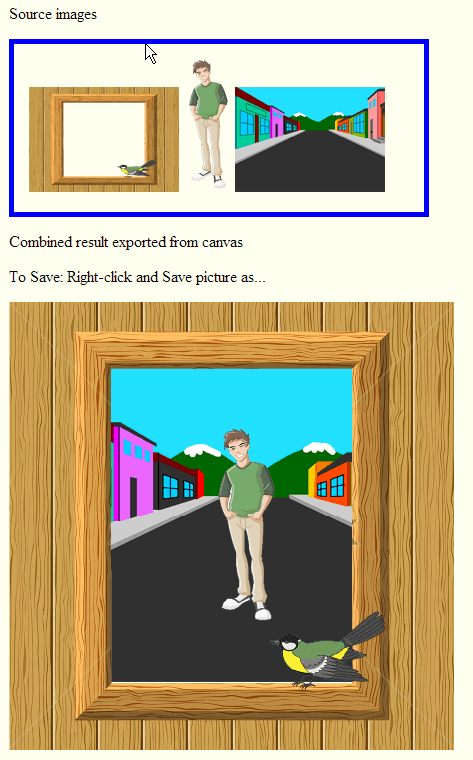
This example fiddle must be viewed with Chrome or Firefox (IE throws a CORS violation):
http://jsfiddle.net/m1erickson/5JTtd/
Here is example code:
<!doctype html>
<html>
<head>
<link rel="stylesheet" type="text/css" media="all" href="css/reset.css" /> <!-- reset css -->
<script type="text/javascript" src="http://code.jquery.com/jquery.min.js"></script>

<style>
    body{ background-color: ivory; padding:15px; }
    canvas{border:1px solid red;}
    #sources{border:5px solid blue; padding:15px; width:380px;}
    p{ margin:15px 0;}
</style>

<script>
$(function(){

    var back=new Image();
    back.onload=function(){ draw(); }
    back.crossOrigin = "Anonymous";
    back.src="https://dl.dropboxusercontent.com/u/139992952/stackoverflow/SPback.png";

    var person=new Image();
    person.onload=function(){ draw(); }
    person.crossOrigin = "Anonymous";
    person.src="https://dl.dropboxusercontent.com/u/139992952/stackoverflow/person.png";

    var awindow=new Image();
    awindow.onload=function(){ draw(); }
    awindow.crossOrigin = "Anonymous";
    awindow.src="https://dl.dropboxusercontent.com/u/139992952/stackoverflow/window.png";

    var count=0;
    function draw(){
        count++;
        if(count<3){ return; }

        var canvas=document.createElement("canvas");
        var ctx=canvas.getContext("2d");
        canvas.width=awindow.width;
        canvas.height=awindow.height;

        ctx.drawImage(back,0,65);
        ctx.drawImage(person,0,0,person.width,person.height,200,125,71,200);
        ctx.drawImage(awindow,0,0);
        var result=document.getElementById("composition");
        result.src=canvas.toDataURL();
    }

}); // end $(function(){});
</script>

</head>

<body>
    <p>Source images</p>
    <div id="sources">
        <img id="front" src="window.png" width=150 height=105>
        <img id="middle" src="person.png" width=48 height=133>
        <img id="back" src="spback.png" width=150 height=105><br>
    </div>
    <p>Combined result exported from canvas</p>
    <p>To Save: Right-click and Save picture as...</p>
    <img id="composition">
</body>
</html>
来源:https://stackoverflow.com/questions/16873682/save-html-div-as-an-image-with-save-as-pop-up