
问题
So I resizing a image using canvas. WHat happens is that is always resizes from the same point with is (0, 0). I want it to change it's pivot/origin according to which anchor is selected to resize. Which means if _ is selected:
- Bottom-Left -> Top-Right
- Bottom-Center -> Top-Center
- Bottom-Right -> Top-Left
- Top-Left -> Bottom-Right
- Top-Center -> Bottom-Center
- Top-Right -> Bottom-RIght
- Left -> Right
- RIght -> Left
Here's what's happening now: http://jsfiddle.net/mareebsiddiqui/2Gtq9/3
Here's my JS:
var canvas = document.getElementById("canvas");
var ctx = canvas.getContext("2d");

//var canvasOffset = $("#canvas").offset();
var offsetX = canvas.offsetLeft;
var offsetY = canvas.offsetTop;

var startX;
var startY;
var isDown = false;


var pi2 = Math.PI * 2;
var resizerRadius = 8;
var rr = resizerRadius * resizerRadius;
var draggingResizer = {
    x: 0,
    y: 0
};
var imageX = 50;
var imageY = 50;
var imageWidth, imageHeight, imageRight, imageBottom;
var draggingImage = false;
var startX;
var startY;


var img = new Image();
img.onload = function () {
    imageWidth = img.width;
    imageHeight = img.height;
    imageRight = imageX + imageWidth;
    imageBottom = imageY + imageHeight
    draw(true, false);
}
img.src = 'img/' + localStorage["bgimgname"];


function draw(withAnchors, withBorders) {

    // clear the canvas
    ctx.clearRect(0, 0, canvas.width, canvas.height);

    // draw the image
    ctx.drawImage(img, 0, 0, img.width, img.height, imageX, imageY, imageWidth, imageHeight);

    // optionally draw the draggable anchors
    if (withAnchors) {
        drawDragAnchor(imageX, imageY); //topleft
        drawDragAnchor((imageRight+imageX)/2, imageY); //topcenter
        drawDragAnchor(imageRight, imageY); //topright

        drawDragAnchor(imageX, (imageBottom+imageY)/2); //left
        drawDragAnchor(imageRight, (imageBottom+imageY)/2); //right

        drawDragAnchor(imageX, imageBottom); //bottomleft
        drawDragAnchor((imageRight+imageX)/2, imageBottom); //bottom center
        drawDragAnchor(imageRight, imageBottom); //bottomright
    }

}

function drawDragAnchor(x, y) {
    ctx.beginPath();
    ctx.arc(x, y, resizerRadius, 0, pi2, false);
    ctx.closePath();
    ctx.fill();
}

function anchorHitTest(x, y) {

    var dx, dy;

    // top-left
    dx = x - imageX;
    dy = y - imageY;
    if (dx * dx + dy * dy <= rr) {
        return (0);
    }

    // top-center
    dx = x - (imageRight+imageX)/2
    dy = y - imageY
    if (dx/2 * dx/2 + dy * dy <= rr) {
        return (1);
    }

    // top-right
    dx = x - imageRight;
    dy = y - imageY;
    if (dx * dx + dy * dy <= rr) {
        return (2);
    }

    //left
    dx = x - imageX;
    dy = y - (imageBottom+imageY)/2
    if (dx * dx + dy/2 * dy/2 <= rr) {
        return (3);
    }

    //right
    dx = x - imageRight;
    dy = y - (imageBottom+imageY)/2
    if (dx * dx + dy/2 * dy/2 <= rr) {
        return (4);
    }

    // bottom-left
    dx = x - imageX;
    dy = y - imageBottom;
    if (dx * dx + dy * dy <= rr) {
        return (5);
    }

    // bottom-center
    dx = x - (imageRight+imageX)/2;
    dy = y - imageBottom;
    if (dx/2 * dx/2 + dy * dy <= rr) {
        return (6);
    }

    // bottom-right
    dx = x - imageRight;
    dy = y - imageBottom;
    if (dx * dx + dy * dy <= rr) {
        return (7);
    }

    return (-1);

}


function hitImage(x, y) {
    return (x > imageX && x < imageX + imageWidth && y > imageY && y < imageY + imageHeight);
}


function handleMouseDown(e) {
    startX = parseInt(e.clientX - offsetX);
    startY = parseInt(e.clientY - offsetY);
    draggingResizer = anchorHitTest(startX, startY);
    draggingImage = draggingResizer < 0 && hitImage(startX, startY);
}

function handleMouseUp(e) {
    draggingResizer = -1;
    draggingImage = false;
    draw(true, false);
}

function handleMouseOut(e) {
    handleMouseUp(e);
}

function handleMouseMove(e) {
    e = window.event;
    if (draggingResizer > -1) {

        mouseX = parseInt(e.clientX - offsetX);
        mouseY = parseInt(e.clientY - offsetY);

        // resize the image
        switch (draggingResizer) {
            case 0:
                //top-left
                console.log("topleft");
                imageHeight -= imageRight - mouseY;
                imageWidth -= imageRight - mouseY;
                break;
            case 1:
                //top-center
                console.log("topcenter");
                imageHeight -= imageBottom - mouseY;
                break;
            case 2:
                //top-right
                console.log("topright");
                imageHeight -= imageBottom - mouseY;
                imageWidth -= imageBottom - mouseY;
                break;
            case 3:
                //left
                console.log("left");
                imageWidth -= imageX - mouseX;
                break;
            case 4:
                //right
                console.log("right");
                imageWidth -= imageRight - mouseX;
                break;
            case 5:
                //bottom-left
                console.log("bottomleft");
                imageHeight -= imageRight - mouseY;
                imageWidth -= imageRight - mouseY;
                break;
            case 6:
                //center
                console.log("bottomcenter");
                imageHeight -= imageBottom - mouseY;
                break;
            case 7:
                //bottom-right
                console.log("bottomright");
                imageHeight -= imageBottom - mouseY;
                imageWidth -= imageBottom - mouseY;
                break;
        }

        if(imageWidth<25){imageWidth=25;}
        if(imageHeight<25){imageHeight=25;}
        if(imageWidth>700){imageWidth=700;}
        if(imageHeight>700){imageHeight=700;}
        // set the image right and bottom
        imageRight = imageX + imageWidth;
        imageBottom = imageY + imageHeight;

        // redraw the image with resizing anchors
        draw(true, true);

    }


}

canvas.addEventListener('mousedown', handleMouseDown);
canvas.addEventListener('mousemove', handleMouseMove);
canvas.addEventListener('mouseup', handleMouseUp);
canvas.addEventListener('mouseout', handleMouseOut);
Please help me out. :(
回答1:
One efficient way of resizing as you desire is to keep the opposite side(s) position fixed and let the selected side float with a dragging side or corner.
A side benefit of this method is that you don't really need the anchors!
This is the way operating system windows work.
When resizing windows you don't have visible anchors to drag, you just drag the side or corner of the window.
A Demo: http://jsfiddle.net/m1erickson/keZ82/
- Left: original image,
- Middle: resize from bottom-left corner & maintain aspect ratio (top-right corner remains fixed)
- Right: resize from bottom & image scales in y direction only (top of image remains fixed)
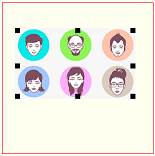
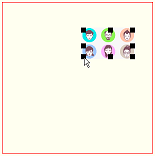
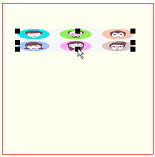
Note: this Demo and example display anchors but they are strictly cosmetic. You can turn the anchor display off and still resize the image by dragging a side or corner of the image.
Example code:
<!doctype html>
<html>
<head>
<link rel="stylesheet" type="text/css" media="all" href="css/reset.css" /> <!-- reset css -->
<script type="text/javascript" src="http://code.jquery.com/jquery.min.js"></script>
<style>
    body{ background-color: ivory; }
    canvas{border:1px solid red;}
</style>
<script>
$(function(){

    var canvas=document.getElementById("canvas");
    var ctx=canvas.getContext("2d");
    var $canvas=$("#canvas");
    var canvasOffset=$canvas.offset();
    var offsetX=canvasOffset.left;
    var offsetY=canvasOffset.top;
    var isDown=false;

    var iW;
    var iH;
    var iLeft=50;
    var iTop=50;
    var iRight,iBottom,iOrientation;

    var img=new Image();
    img.onload=function(){
        iW=img.width;
        iH=img.height;
        iRight=iLeft+iW;
        iBottom=iTop+iH;
        iOrientation=(iW>=iH)?"Wide":"Tall";
        draw(true);
    }
    img.src="facesSmall.png";

    var border=10;
    var isLeft=false;
    var isRight=false;
    var isTop=false;
    var isBottom=false;
    var iAnchor;

    canvas.onmousedown=handleMousedown;
    canvas.onmousemove=handleMousemove;
    canvas.onmouseup=handleMouseup;
    canvas.onmouseout=handleMouseup;


    function hitResizeAnchor(x,y){

        // which borders are under the mouse
        isLeft=(x>iLeft && x<iLeft+border);
        isRight=(x<iRight && x>iRight-border);
        isTop=(y>iTop && y<iTop+border);
        isBottom=(y<iBottom && y>iBottom-border);

        // return the appropriate anchor
        if(isTop && isLeft){ return(iOrientation+"TL"); }
        if(isTop && isRight){ return(iOrientation+"TR"); }
        if(isBottom && isLeft){ return(iOrientation+"BL"); }
        if(isBottom && isRight){ return(iOrientation+"BR"); }
        if(isTop){ return("T"); }
        if(isRight){ return("R"); }
        if(isBottom){ return("B"); }
        if(isLeft){ return("L"); }
        return(null);
    }

    var resizeFunctions={

        T: function(x,y){ iTop=y; },
        R: function(x,y){ iRight=x; },
        B: function(x,y){ iBottom=y; },
        L: function(x,y){ iLeft=x; },

        WideTR: function(x,y){
            iRight=x;
            iTop=iBottom-(iH*(iRight-iLeft)/iW);
        },
        TallTR: function(x,y){
            iTop=y;
            iRight=iLeft+(iW*(iBottom-iTop)/iH);
        },

        WideBR: function(x,y){
            iRight=x;
            iBottom=iTop+(iH*(iRight-iLeft)/iW);
        },
        TallBR: function(x,y){
            iBottom=y;
            iRight=iLeft+(iW*(iBottom-iTop)/iH);
        },

        WideBL: function(x,y){
            iLeft=x;
            iBottom=iTop+(iH*(iRight-iLeft)/iW);
        },
        TallBL: function(x,y){
            iBottom=y;
            iLeft=iRight-(iW*(iBottom-iTop)/iH);
        },

        WideTL: function(x,y){
            iLeft=x;
            iTop=iBottom-(iH*(iRight-iLeft)/iW);
        },
        TallTL: function(x,y){
            iBottom=y;
            iLeft=iRight-(iW*(iBottom-iTop)/iH);
        }
    };

    function handleMousedown(e){
         // tell the browser we'll handle this mousedown
         e.preventDefault();
         e.stopPropagation();
         var mouseX=e.clientX-offsetX;
         var mouseY=e.clientY-offsetY;
         iAnchor=hitResizeAnchor(mouseX,mouseY);
         isDown=(iAnchor);
    }

    function handleMouseup(e){
         // tell the browser we'll handle this mouseup
         e.preventDefault();
         e.stopPropagation();
         isDown=false;
         draw(true);
    }

    function handleMousemove(e){
         // tell the browser we'll handle this mousemove
         e.preventDefault();
         e.stopPropagation();
         // return if we're not dragging
         if(!isDown){return;}
         // get MouseX/Y
         var mouseX=e.clientX-offsetX;
         var mouseY=e.clientY-offsetY;

         // reset iLeft,iRight,iTop,iBottom based on drag
         resizeFunctions[iAnchor](mouseX,mouseY);

         // redraw the resized image
         draw(false);
    }


    function draw(withAnchors){
        var cx=iLeft+(iRight-iLeft)/2;
        var cy=iTop+(iBottom-iTop)/2;
        ctx.clearRect(0,0,canvas.width,canvas.height);
        ctx.drawImage(img,iLeft,iTop,iRight-iLeft,iBottom-iTop);
        if(withAnchors){
            ctx.fillRect(iLeft,iTop,border,border);
            ctx.fillRect(iRight-border,iTop,border,border);
            ctx.fillRect(iRight-border,iBottom-border,border,border);
            ctx.fillRect(iLeft,iBottom-border,border,border);
            ctx.fillRect(cx,iTop,border,border);
            ctx.fillRect(cx,iBottom-border,border,border);
            ctx.fillRect(iLeft,cy,border,border);
            ctx.fillRect(iRight-border,cy,border,border);
        }
    }

}); // end $(function(){});
</script>
</head>
<body>
    <h4>Drag image anchors</h4>
    <canvas id="canvas" width=300 height=300></canvas>
</body>
</html>
来源:https://stackoverflow.com/questions/22746605/change-origin-of-canvas-drawn-image