
问题
I wanna to fill a path like a circle or a custom path with an image but wanna the image to stretch, so that the pixels of the image don't reside outside the closed path. Is this possible to achieve in HTML5 using the Canvas object ?
Here is my custom path:
ctx.beginPath();
    ctx.moveTo(170, 80);
    ctx.bezierCurveTo(130, 100, 130, 150, 230, 150);
    ctx.bezierCurveTo(250, 180, 320, 180, 340, 150);
    ctx.bezierCurveTo(420, 150, 420, 120, 390, 100);
    ctx.bezierCurveTo(430, 40, 370, 30, 340, 50);
    ctx.bezierCurveTo(320, 5, 250, 20, 250, 50);
    ctx.bezierCurveTo(200, 5, 150, 20, 170, 80);

    // complete custom shape
    ctx.closePath();
    ctx.lineWidth = 5;

    ctx.fillStyle = '#8ED6FF';
    ctx.fill();

    ctx.strokeStyle = 'blue';
    ctx.stroke();
What I wanna to achieve is to fill the cloud with an image but stretch it. Doesn't matter if it look ugly.
回答1:
[Edit based on more info from OP]
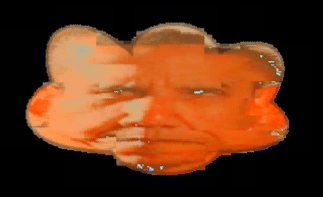
ima.js, is a small image script that will combine 2 images like this:
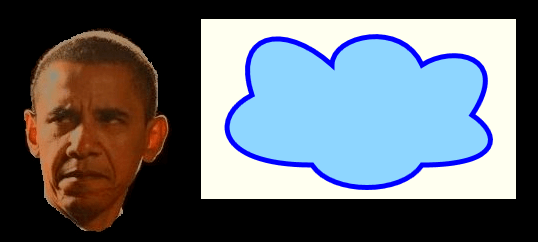
Into a single warp-envelope image like this using canvas:
You can see a demo at: http://ima.hobby.infi.nl/#
And the script is available at: http://ima.hobby.infi.nl/ima.js
[Previous answer before OP added more info]
You can clip an image inside of a path.
And yes, you can "stretch" an undersized image like this:
context.drawImage(image,0,0,image.width,image.height,0,0,canvas.width,canvas.height);
Here is code and a Fiddle: http://jsfiddle.net/m1erickson/T4eN8/
<!doctype html>
<html>
<head>
<link rel="stylesheet" type="text/css" media="all" href="css/reset.css" /> <!-- reset css -->
<script type="text/javascript" src="http://code.jquery.com/jquery.min.js"></script>

<style>
    body{ background-color: ivory; }
    canvas{border:1px solid red;}
</style>

<script>
    $(function(){

    var canvas=document.getElementById("canvas");
    var ctx=canvas.getContext("2d");

    // draw the cloud
    ctx.beginPath();
    ctx.moveTo(170, 80);
    ctx.bezierCurveTo(130, 100, 130, 150, 230, 150);
    ctx.bezierCurveTo(250, 180, 320, 180, 340, 150);
    ctx.bezierCurveTo(420, 150, 420, 120, 390, 100);
    ctx.bezierCurveTo(430, 40, 370, 30, 340, 50);
    ctx.bezierCurveTo(320, 5, 250, 20, 250, 50);
    ctx.bezierCurveTo(200, 5, 150, 20, 170, 80);
    ctx.closePath();
    ctx.lineWidth = 5;
    ctx.fillStyle = '#8ED6FF';
    ctx.fill();
    ctx.strokeStyle = 'blue';
    ctx.stroke();

    // clip any subsequent draws to the cloud
    ctx.beginPath();
    ctx.moveTo(170, 80);
    ctx.bezierCurveTo(130, 100, 130, 150, 230, 150);
    ctx.bezierCurveTo(250, 180, 320, 180, 340, 150);
    ctx.bezierCurveTo(420, 150, 420, 120, 390, 100);
    ctx.bezierCurveTo(430, 40, 370, 30, 340, 50);
    ctx.bezierCurveTo(320, 5, 250, 20, 250, 50);
    ctx.bezierCurveTo(200, 5, 150, 20, 170, 80);
    ctx.closePath();
    ctx.clip();

    // draw an image inside the cloud
    var img=new Image();
    img.onload=function(){
        ctx.drawImage(this,0,0,img.width,img.height);
    }
    img.src="http://www.gcc.edu/_layouts/GCC/Backgrounds/1024.jpg";

    }); // end $(function(){});
</script>

</head>

<body>
    <canvas id="canvas" width=600 height=400></canvas>
</body>
</html>
来源:https://stackoverflow.com/questions/15167186/fill-a-path-with-image-and-stretch-image-in-canvas-html5