
问题
I have below code to create a gridview in asp.net and inside gridview I have a delete button. Below code works fine and shows Delete in all rows. I want to hide/ Disable the Delete button in very first row. Can somebody suggest the code part?
<asp:gridview ID="Gridview1" runat="server"
  ShowFooter="true" AutoGenerateColumns="false">
     <Columns>
            <asp:BoundField DataField="RowNumber" HeaderText="Row Number" />
                <asp:TemplateField HeaderText="Cat">
                <ItemTemplate>
                    <asp:TextBox ID="TextBoxCat" runat="server" Enabled="false"></asp:TextBox>
                </ItemTemplate>
            </asp:TemplateField>
              <asp:TemplateField HeaderText="Delete" >
                            <ItemTemplate>
                                <asp:LinkButton ID="DeleteItemsGridRowButton" runat="server">Delete</asp:LinkButton>
                            </ItemTemplate>
                        </asp:TemplateField>
            </Columns>
        </asp:gridview>
回答1:
You can use GridView.RowDataBound Event event.
Then find the LinkButton using FindControl method.
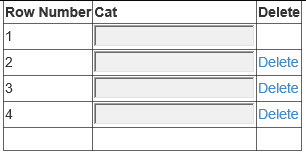
public class Animal
{
    public int RowNumber { get; set; }
    public string Name { get; set; }
}

protected void Page_Load(object sender, EventArgs e)
{
    if (!IsPostBack)
    {
        Gridview1.DataSource = new List<Animal>
        {
            new Animal {RowNumber = 1, Name = "One"},
            new Animal {RowNumber = 2, Name = "Two"},
            new Animal {RowNumber = 3, Name = "Three"},
            new Animal {RowNumber = 4, Name = "Four"},
        };
        Gridview1.DataBind();
    }
}

private int _counter;

protected void GridView1_RowDataBound(object sender, GridViewRowEventArgs e)
{
    if (e.Row.RowType == DataControlRowType.DataRow)
    {
        if (_counter == 0)
        {
            var linkButton = e.Row.FindControl("DeleteItemsGridRowButton")
                as LinkButton;
            linkButton.Visible = false;
            _counter++;
        }
    }

}
回答2:
Try This:
protected void GridView1_RowDataBound(object sender, GridViewRowEventArgs e)
{
   if(GridView1.Rows.Count>0)
   {
    //GridView1.Rows[0].Visible = false;
       LinkButton DeleteItemsGridRowButton=   (LinkButton) GridView1.Rows[0].FindControl("DeleteItemsGridRowButton");
       if(DeleteItemsGridRowButton!=null)
       {
        DeleteItemsGridRowButton.Visible=false
       }
   }
}
来源:https://stackoverflow.com/questions/24444145/disable-hide-a-control-inside-a-specific-row-of-gridview