
问题
I am trying to display two query result in a single gridview. I surfed a lot in internet but I did not get a proper answer. Kindly help anyone. My sample query
    int shift=0;
    int month = Convert.ToInt32( ddmonth.SelectedItem.Value);// should be in the format of Jan, Feb, Mar, Apr, etc...
    int yearofMonth = Convert.ToInt32(ddyear.Text);
    DateTime dateTime = Convert.ToDateTime(month + "-" + "01-" + yearofMonth);
    string month1 = dateTime.Month.ToString();
    int year = Convert.ToInt32(ddyear.Text);
    DataRow dr;
    DataTable dt = new DataTable();
    dt.Columns.Add("Sunday");
    dt.Columns.Add("Monday");
    dt.Columns.Add("Tuesday");
    dt.Columns.Add("Wednesday");
    dt.Columns.Add("Thursday");
    dt.Columns.Add("Friday");
    dt.Columns.Add("Saturday");
    dr = dt.NewRow();


    for (int i = 0; i < DateTime.DaysInMonth(year, month); i += 1)
    {
        qry = "select s.Shiftname from ShiftType s,ShiftAllocation a where s.ShiftID=a.ShiftID";
        empdt = conn.gettable(qry);
        string data = empdt.Rows[shift][0].ToString();
        empdt.Columns.Add(data);
        row = empdt.NewRow();
        if (Convert.ToDateTime(dateTime.AddDays(i)).ToString("dddd") == "Sunday")
        {
            dr["Sunday"] = i + 1;
            row[data] = empdt.Rows[shift][0].ToString();
        }
        if (Convert.ToDateTime(dateTime.AddDays(i)).ToString("dddd") == "Monday")
        {
            dr["Monday"] = i + 1;
            row[data] = empdt.Rows[shift][0].ToString();
        }
        if (dateTime.AddDays(i).ToString("dddd") == "Tuesday")
        {
            dr["Tuesday"] = i + 1;
            row[data] = empdt.Rows[shift][0].ToString();
        }
        if (dateTime.AddDays(i).ToString("dddd") == "Wednesday")
        {
            dr["Wednesday"] = i + 1;
            row[data] = empdt.Rows[shift][0].ToString();

        }
        if (dateTime.AddDays(i).ToString("dddd") == "Thursday")
        {
            dr["Thursday"] = i + 1;
            row[data] = empdt.Rows[shift][0].ToString();
        }
        if (dateTime.AddDays(i).ToString("dddd") == "Friday")
        {
            dr["Friday"] = i + 1;
            row[data] = empdt.Rows[shift][0].ToString();
        }
        if (dateTime.AddDays(i).ToString("dddd") == "Saturday")
        {
            dr["Saturday"] = i + 1;
            row[data] = empdt.Rows[shift][0].ToString();
            dt.Rows.Add(dr);
            dr = dt.NewRow();
            empdt.Rows.Add((row.ItemArray));
            row = empdt.NewRow();
            continue;
        }
        if (i == DateTime.DaysInMonth(dateTime.Year, dateTime.Month) - 1)
        {
            dt.Rows.Add(dr);
            dr = dt.NewRow();
            empdt.Rows.Add((row.ItemArray));
            row = empdt.NewRow();
        }

    }
    GridView1.DataSource = dt;
    GridView1.DataBind();
This is my actual code I am trying to create an event Calender. My expected o/p is just like
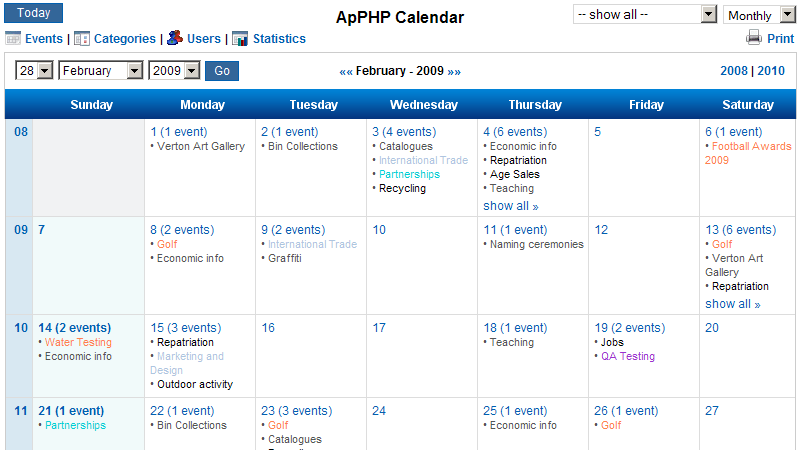
Now GridView displays only dt values and I want to display the query result empdt as the events
回答1:
string qry="select Name,Age from table Sample1 inner join table Sample2 on table Sample1.CustomerID = table Sample2.CustomerID";

dr1=con.query(qry);
GridView1 DataSource=dr1;
GridView1 DataBind();
Both table must have same column name "CustomerID". Then you can use this query.
回答2:
Join Both tables using Join keyword and then bind the data to GridView.
来源:https://stackoverflow.com/questions/29205509/how-can-i-display-two-query-result-in-a-single-gridview