
问题
I have an app that handels Arabic too, but my Arabic users have a problem that the drawText flip the word .. Arabic must be from right to left. How do I make the canvas drawText from right to left?
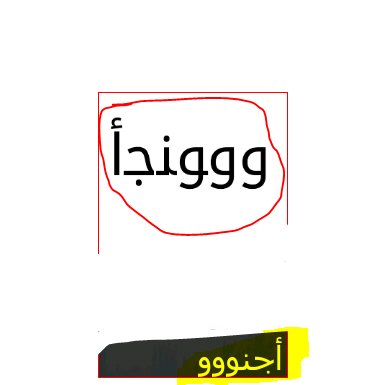
See in the picture the highlighted text is the right text its a textView and it's fine. But the canvas DrawText the one in a circle is wrong. It must be from right to left, how do I make the canvas drawText from right to left?
回答1:
On the canvas just create two points on sides where you want to draw text, and then create path between them. use this method it will work fine
Path path = new Path();
Paint paint = new Paint();
path.moveTo(p2.x, p2.y);
path.lineTo(p1.x, p1.y);
canvas.drawTextOnPath(String.valueOf(txt), path, (float) (c.getWidth() / (2.3)),  (float) (c.getHeight()/2 + paint.getTextSize()/1.5), paint);
回答2:
Make sure that Android emulator that contains the Arabic language, I had the same problem but when I tried the application on an actual mobile device,It solved. There are no problems in your application in the language, make sure Android emulator supports the Arabic language
回答3:
you can get subString from your string and draw in your canvas:
            Paint textPaint = new Paint();
            textPaint.setColor(Color.BLACK);
            textPaint.setStyle(Paint.Style.FILL_AND_STROKE);
            textPaint.setTextSize(20);
            textPaint.setTypeface(Typeface.DEFAULT_BOLD);
            textPaint.setStrokeWidth(1);


            String subString = mString;
            float textWidth = textPaint.measureText(mString);

           int endOffset = Math.round(rectWidth * (mString.length() - 1) / textWidth);
            if (textWidth > rectWidth) {
                endOffset =endOffset - 2;
                subString = mString.substring(0, endOffset);
                subString = subString + "..";
            }else{
                for(int j=mString.length();j<endOffset+1;j++){
                    subString+=" ";
                }
            }


            canvas.drawText(subString, padding , (float) (startHeight + eachHeight / 3 + textPaint.getTextSize() / 1.5), textPaint);
in this way we have a same result even in RTL or LTR string .
回答4:
If your target device is api level greater than 11 you can use rotateY=180 attribute in TextView element. Also the parent view should set to rotateY = 180.
来源:https://stackoverflow.com/questions/12121591/android-canvas-drawtext-from-right-to-left