
问题
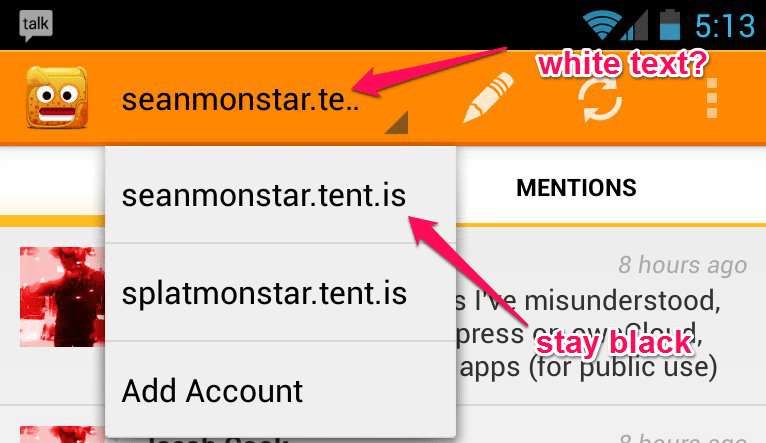
I'm trying to style the action bar list navigation such that it has white text in the closed state. When I've done that, though, it has turned all the text white, which doesn't work with the white dropdown.
Is there a way to style each individually? The docs are non-existant :(
回答1:
Add Custom Layout for your Adapter. in this i have created one layout inside that i have add one TextView. with text color and background color.
and set atapter like:
ArrayAdapter<String> adapter = new ArrayAdapter<String>(
                getBaseContext(), R.layout.my_spinner_style, R.id.textView1,
                COUNTRIES);
here
R.layout.my_spinner_style is my custom layout.
R.id.textView1 is textview id from my_spinner_style.xml.
you can also applay your awn style inside TextView. check this and this aretical.
check this code:
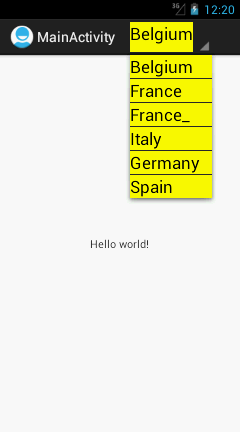
inside onCreate:
/** Create an array adapter to populate dropdownlist */
        ArrayAdapter<String> adapter = new ArrayAdapter<String>(
                getBaseContext(), R.layout.my_spinner_style, R.id.textView1,
                COUNTRIES);

        /** Enabling dropdown list navigation for the action bar */
        getActionBar().setNavigationMode(ActionBar.NAVIGATION_MODE_LIST);

        /** Defining Navigation listener */
        ActionBar.OnNavigationListener navigationListener = new OnNavigationListener() {

            @Override
            public boolean onNavigationItemSelected(int itemPosition,
                    long itemId) {
                Toast.makeText(getBaseContext(),
                        "You selected : " + COUNTRIES[itemPosition],
                        Toast.LENGTH_SHORT).show();
                return false;
            }
        };

        /**
         * Setting dropdown items and item navigation listener for the actionbar
         */
        getActionBar().setListNavigationCallbacks(adapter, navigationListener);
my_spinner_style.xml
<LinearLayout xmlns:android="http://schemas.android.com/apk/res/android"
    android:layout_width="fill_parent"
    android:layout_height="fill_parent"
    android:background="#FFFF00" >

    <TextView
        android:id="@+id/textView1"
        android:layout_width="match_parent"
        android:layout_height="wrap_content"
        android:text="Large Text"
        android:textAppearance="?android:attr/textAppearanceLarge" />

</LinearLayout>
回答2:
Probably, you can do it programmatically (though I never tried it):
  public boolean onCreateOptionsMenu(Menu menu) {
    getMenuInflater().inflate(R.menu.menuId, menu);

    menu.findItem(R.id.itemId).getActionView().setBackground(...)
  }
回答3:
If you use an Adapter (which must by definition implement SpinnerAdapter) you have two callbacks that you can override. getView will be called for the "selected" item. getDropDownView will get called for the drop-down items. You can set your different text colors there.
来源:https://stackoverflow.com/questions/15824793/action-bar-dropdown-open-and-closed-item-styles