
问题
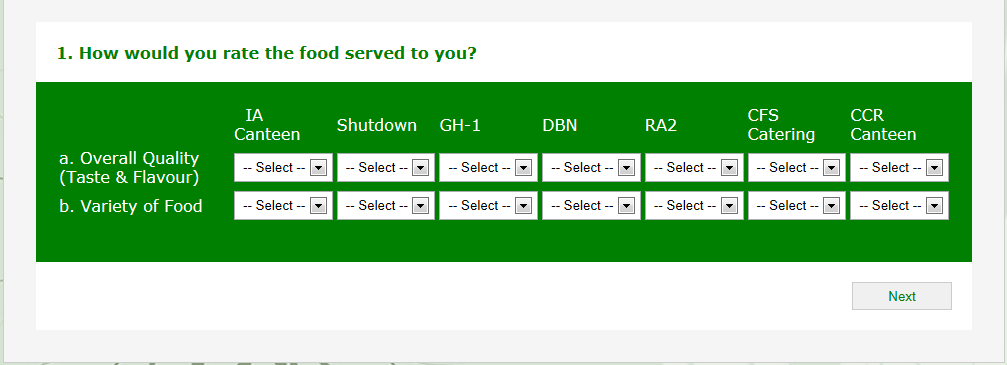 Hi Guys,
I'm working on a simple survey application. I'm faced with the challenge of generating the survey form dynamically from the already existing database question categories.
Basically, I have the questions in 3 major question category with the first category having 2 questions, the second having 3 question and the 3rd also having 3 questions...making 8 questions from 3 major question category.
When I wanted to implement this, the gridView came to mind which eventually I used to generate the form interface. The challenge is, I can't get to format the generated interface the way I need. The image of the generated form interface can be accessed also here: http://brandberries.com.ng/interface.html
and here is the codeBehind:
public partial class Survey : System.Web.UI.Page
{
    string responder = WindowsIdentity.GetCurrent().Name.ToString();
    int catID;
    int qID;
    int canteenID;
    string response;
    string comments;
    string comment;
    string responseDate = DateTime.Now.ToShortDateString().ToString();

    SqlDataSource sds1 = new SqlDataSource();

    protected void Page_Init(object sender, EventArgs e)
    {
        // set dataSource properties
        sds1.ConnectionString = "Data Source=BNY-D-1245;Initial Catalog=canteenSurvey;Integrated Security=True";
        sds1.ProviderName = "System.Data.SqlClient";


        // bind datasource to page
        sds1.DataBind();
        //sds2.DataBind();
    }
    protected void Page_Load(object sender, EventArgs e)
    {

    }
    protected void gvCategory_PreRender(object sender, EventArgs e)
    {
        foreach (GridViewRow item in gvCategory.Rows)
        {
            catID = (int)gvCategory.DataKeys[item.RowIndex].Value;

            GridView gvQuestion = (GridView)item.FindControl("gvQuestion");

            sds1.SelectCommand = "SELECT * FROM tblQuestion WHERE [CatID] = " + catID;

            gvQuestion.Columns[0].Visible = true;
            gvQuestion.DataSource = sds1;
            gvQuestion.DataBind();
            gvQuestion.Columns[0].Visible = false;

            foreach (GridViewRow row in gvQuestion.Rows)
            {
                qID = (int)gvQuestion.DataKeys[row.RowIndex].Value;
            }

        }

    }

    protected void btnSubmit_Click(object sender, EventArgs e)
    {
        foreach (GridViewRow masterItem in gvCategory.Rows)
        {
            catID = (int)gvCategory.DataKeys[masterItem.RowIndex].Value;

            GridView gvQuestion = (GridView)masterItem.FindControl("gvQuestion");

            foreach (GridViewRow masterRow in gvQuestion.Rows)
            {
                qID = (int)gvQuestion.DataKeys[masterRow.RowIndex].Value;

                GridView gvCanteen = (GridView)masterRow.FindControl("gvCanteen");

                foreach (GridViewRow masterData in gvCanteen.Rows)
                {
                    canteenID = (int)gvCanteen.DataKeys[masterData.RowIndex].Value;
                    response = ((DropDownList)masterData.FindControl("ddlResponse")).SelectedValue;
                    //TextBox userComment = gvCanteen.FindControl("txtComment") as TextBox;
                    //comment = userComment.Text;
                }
            }
        }

        comments = txtComments.Text;
        // Insert into the database

        string constr = "Data Source=BNY-D-1245;Initial Catalog=canteenSurvey;Integrated Security=True";

        // SQL Query to insert values into the database

        string sqlQuery = "INSERT INTO tblFeedBack (catID, qID, canteenID, response, responder, responseDate)";
        sqlQuery += "VALUES (@catID, @qID, @canteenID, @response, @responder, @responseDate )";

        //string sqlQuery2 = "INSERT INTO tblComments (responder, comments) VALUES (@responder, @comments)";

        //SqlCommand query = new SqlCommand();
        using (SqlConnection dataConnection = new SqlConnection(constr))
        {
            using (SqlCommand dataCommand = dataConnection.CreateCommand())
            {
                dataConnection.Open();
                dataCommand.CommandType = CommandType.Text;
                dataCommand.CommandText = sqlQuery;
                dataCommand.Parameters.AddWithValue("@catID", catID);
                dataCommand.Parameters.AddWithValue("@qID", qID);
                dataCommand.Parameters.AddWithValue("@canteenID", canteenID);
                dataCommand.Parameters.AddWithValue("@response", response);
                dataCommand.Parameters.AddWithValue("@responder", responder);
                dataCommand.Parameters.AddWithValue("@responseDate", responseDate);

                dataCommand.ExecuteNonQuery();
                dataConnection.Close();
            }

        }

    }
}
and here is the aspx file for the survey interface:
<%@ Page Language="C#" AutoEventWireup="true" CodeFile="Survey.aspx.cs" MasterPageFile="~/MasterPage.master" Inherits="Survey" %>
<asp:Content ID="Content1" ContentPlaceHolderID="head" runat="Server">
</asp:Content>
<asp:Content ID="Content2" ContentPlaceHolderID="ContentPlaceHolder1" runat="Server">
<form id="form1" runat="server">
<div class="formStyle">
<asp:GridView ID="gvCategory" runat="server" AllowSorting="True"
AutoGenerateColumns="False" DataKeyNames="catID" DataSourceID="CategorySDS"
EnableModelValidation="True" onprerender="gvCategory_PreRender"
CellPadding="4" CssClass="formStyle" ForeColor="#333333" GridLines="None"
Width="100%">
<AlternatingRowStyle BackColor="White" />
<Columns>
<asp:BoundField DataField="catID" HeaderText="catID" ReadOnly="True"
SortExpression="catID" Visible="false"/>
<asp:BoundField DataField="category" HeaderText="category"
SortExpression="category" />
<asp:TemplateField HeaderText="Questions">
<ItemTemplate>
<asp:GridView ID="gvQuestion" runat="server" AutoGenerateColumns="False"
DataKeyNames="qID" EnableModelValidation="True" CellPadding="4"
ForeColor="#333333" GridLines="None">
<AlternatingRowStyle BackColor="White" />
<Columns>
<asp:BoundField DataField="qID" HeaderText="qID" ReadOnly="True"
SortExpression="qID"/>
<asp:BoundField DataField="question" HeaderText="question"
SortExpression="question" />
<asp:TemplateField HeaderText="Canteen">
<ItemTemplate>
<asp:Panel ID="Panel1" runat="server">
<asp:GridView ID="gvCanteen" runat="server" AllowSorting="True"
AutoGenerateColumns="False" DataKeyNames="canteenID" DataSourceID="CanteenSDS"
EnableModelValidation="True" CellPadding="4" ForeColor="#333333"
GridLines="None">
<AlternatingRowStyle BackColor="White" />
<Columns>
<asp:BoundField DataField="canteenID" HeaderText="canteenID" ReadOnly="True"
SortExpression="canteenID" Visible="False" />
<asp:BoundField DataField="canteen" HeaderText="canteen"
SortExpression="canteen" />
<asp:TemplateField HeaderText="Response">
<ItemTemplate>
<asp:DropDownList ID="ddlResponse" runat="server" AppendDataBoundItems="True"
DataSourceID="ResponseSDS" DataTextField="response"
DataValueField="responseID" CssClass="formStyle">
<asp:ListItem Selected="True">--Select a Response--</asp:ListItem>
</asp:DropDownList>
<asp:SqlDataSource ID="ResponseSDS" runat="server"
ConnectionString="<%$ ConnectionStrings:canteenSurveyConnectionString %>"
SelectCommand="SELECT * FROM [tblResponse]"></asp:SqlDataSource>
</ItemTemplate>
</asp:TemplateField>
</Columns>
<EditRowStyle BackColor="#2461BF" />
<FooterStyle BackColor="#507CD1" Font-Bold="True" ForeColor="White" />
<HeaderStyle BackColor="#507CD1" Font-Bold="True" ForeColor="White" />
<PagerStyle BackColor="#2461BF" ForeColor="White" HorizontalAlign="Center" />
<RowStyle BackColor="#EFF3FB" />
<SelectedRowStyle BackColor="#D1DDF1" Font-Bold="True" ForeColor="#333333" />
</asp:GridView>
<asp:SqlDataSource ID="CanteenSDS" runat="server"
ConnectionString="<%$ ConnectionStrings:canteenSurveyConnectionString %>"
SelectCommand="SELECT * FROM [tblCanteen]"></asp:SqlDataSource>
</asp:Panel>
</ItemTemplate>
</asp:TemplateField>
</Columns>
<EditRowStyle BackColor="#2461BF" />
<FooterStyle BackColor="#507CD1" Font-Bold="True" ForeColor="White" />
<HeaderStyle BackColor="#507CD1" Font-Bold="True" ForeColor="White" />
<PagerStyle BackColor="#2461BF" ForeColor="White" HorizontalAlign="Center" />
<RowStyle BackColor="#EFF3FB" />
<SelectedRowStyle BackColor="#D1DDF1" Font-Bold="True" ForeColor="#333333" />
</asp:GridView>
</ItemTemplate>
</asp:TemplateField>
</Columns>
<EditRowStyle BackColor="#2461BF" />
<FooterStyle BackColor="#507CD1" Font-Bold="True" ForeColor="White" />
<HeaderStyle BackColor="#507CD1" Font-Bold="True" ForeColor="White" />
<PagerStyle BackColor="#2461BF" ForeColor="White" HorizontalAlign="Center" />
<RowStyle BackColor="#EFF3FB" />
<SelectedRowStyle BackColor="#D1DDF1" Font-Bold="True" ForeColor="#333333" />
</asp:GridView>
<table style="width: 100%;">
<tr>
<td class="style1">
</td>
<td>
Comments
</td>
</tr>
<tr>
<td class="style1">
</td>
<td>
<asp:TextBox ID="txtComments" runat="server" Width="50%"></asp:TextBox>
</td>
</tr>
</table>
<asp:SqlDataSource ID="CategorySDS" runat="server"
ConnectionString="<%$ ConnectionStrings:canteenSurveyConnectionString %>"
SelectCommand="SELECT * FROM [tblCategory]"></asp:SqlDataSource>
</div>
<div>
<asp:Button ID="btnSubmit" runat="server" Text="Submit"
onclick="btnSubmit_Click" />
</div>
</form>
</asp:Content>
Is there anyways I can format the gridview generated code to look something more organized like the attached?
I welcome very technique available for use to either improve on the first interface or change the entire interface to the second one without changing my table structure.
来源:https://stackoverflow.com/questions/20881789/generating-form-for-a-simple-asp-net-survey-application