
问题
I use VS 2013 (VB) and asp.net.
I have a gridview created programatically using values from an MS SQL 2012 table.
The asp.net for the gridview is as follows
<asp:GridView ID="availableRuns" runat="server" HorizontalAlign="Center" CssClass="Asset_table" HeaderStyle-CssClass="Asset_table_header" ></asp:GridView>
The VB code for the gridview is
    Dim RTORun As New RTO
    Dim RTORuns As New List(Of RTO)
    RTORuns = RTORun.getRTO
    availableRuns.DataSource = RTORuns
    availableRuns.DataBind()
I have another sub that I want to use to convert the values in the cells to images which is Currently used to change the text value.
    Protected Sub changeText()

    Dim row As GridViewRow

    For Each row In availableRuns.Rows
        Dim i As Integer

        For i = 0 To row.Cells.Count - 1
            If row.Cells(i).Text = "1" Then
                row.Cells(i).Text = "Yes"
            ElseIf row.Cells(i).Text = "0" Then
                row.Cells(i).Text = ""
            End If
        Next

    Next
End Sub
This produces the following gridview
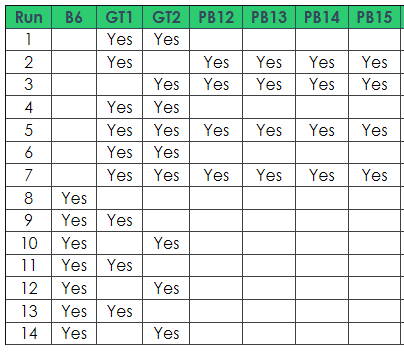
I want to be able to insert an image in replacement for 1 (or Yes as it is in the image) and leave it blank if 0. I have no idea how to do this can anyone offer some pointers as googling hasnt helped as they all reference an image control in the asp.net page which I dont have.
回答1:
You can do it in 2 ways - either direct HTML assignment:
If row.Cells(i).Text = "1" Then
                row.Cells(i).Text = "<img src='MyYesImg.jpg' />"
where "MyYesImg.jpg" is an image that exists in the same folder as your ASPX page. Also you have to make sure that grid columns have their HtmlEncode property set to False for image to propertly display.
Or, by programmaticaly adding Image Control (which you do have - it's a standard ASP.NET control, part of the framework)
Dim img As Image
'...loop code
If row.Cells(i).Text = "1" Then
    row.Cells(i).Text = ""
    img = New Image
    img.ImageUrl = "MyYesImg.jpg"
    row.Cells(i).Controls.Add(img)
Again "MyYesImg.jpg" is the image file that exists in the same folder as your ASPX page
来源:https://stackoverflow.com/questions/22227468/insert-an-image-into-a-gridview-cell-depending-on-text