案例1
在es查询中按照多列分组的时候 分组列的count值会越来越少 es默认隐藏了没有被分组匹配到的记录数 需要在查询的时候开启
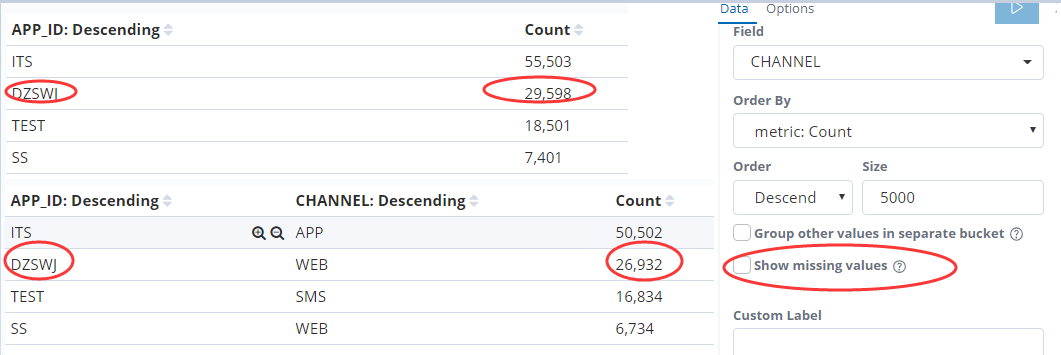
2.开启显示没有被分组成功的记录
分组成功的记录加上分组missing的记录数就等于总的记录数 26932+2666=29598
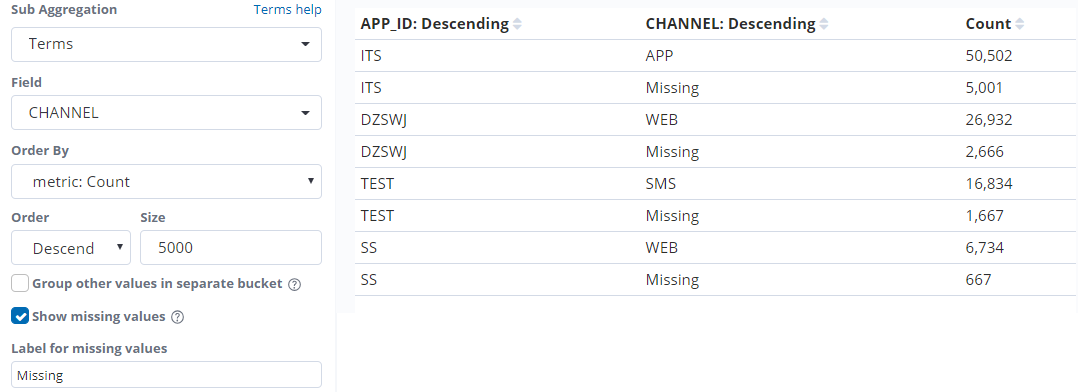
3.当实际的总数和es分组统计的条数对不上的时候 需要考虑是不是分组列的值有可能被丢失了 这个时候可以开启显示丢失
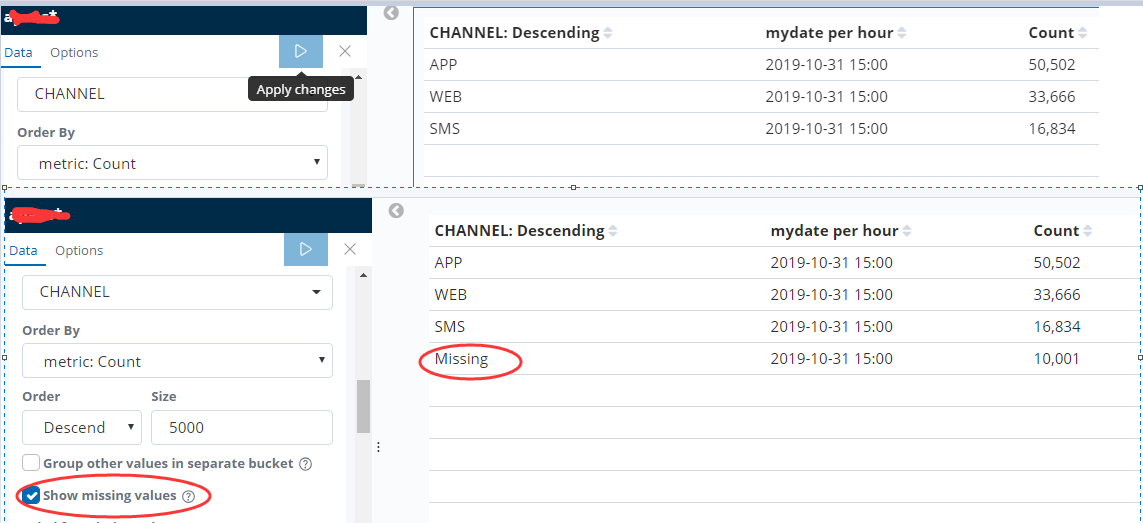
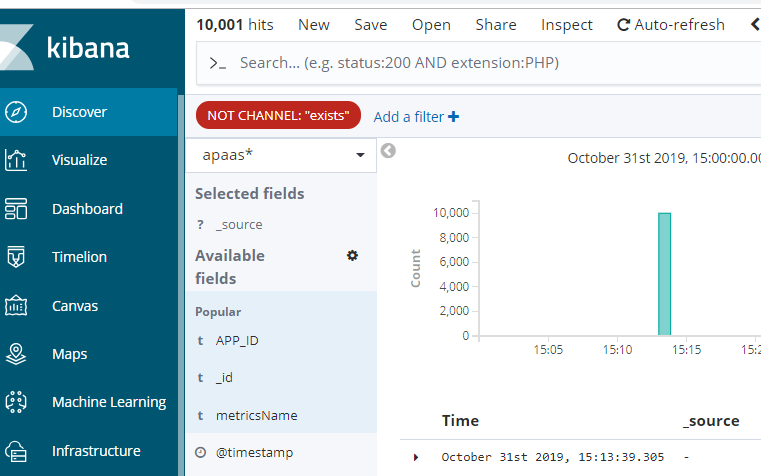
4.查看es的原始日志内容确实有10001条记录不存在CHANNEL字段
实例统计


#!/usr/bin/env python
# -*- coding: utf-8 -*-


from elasticsearch6 import Elasticsearch
import datetime
import time
import re

es = Elasticsearch("http://10.000.142.88:9200")

#每小时定时执行统计前一个小时的数据
def formartTime(startTime):
    try:
        startTime = datetime.datetime.strptime(startTime, '%Y-%m-%dT%H:%M:%S.%f')
    except Exception as e:
        startTime = datetime.datetime.strptime(startTime, '%Y-%m-%d %H:%M:%S')
    startTime = startTime.strftime('%Y-%m-%d %H:%M:%S.%f')[:-13]
    return startTime+":00:00"

def strtime_to_datetime(timestr):
    """将字符串格式的时间 (含毫秒) 转为 datetime 格式
    :param timestr: {str}'2016-02-25 20:21:04.242'
    :return: {datetime}2016-02-25 20:21:04.242000
    """
    local_datetime = datetime.datetime.strptime(timestr, "%Y-%m-%d %H:%M:%S.%f")
    return local_datetime

def datetime_to_timestamp(datetime_obj):
    """将本地(local) datetime 格式的时间 (含毫秒) 转为毫秒时间戳
    :param datetime_obj: {datetime}2016-02-25 20:21:04.242000
    :return: 13 位的毫秒时间戳  1456402864242
    """
    local_timestamp = int(time.mktime(datetime_obj.timetuple()) * 1000.0 + datetime_obj.microsecond / 1000.0)
    return local_timestamp

def strtime_to_timestamp(local_timestr):
    """将本地时间 (字符串格式,含毫秒) 转为 13 位整数的毫秒时间戳
    :param local_timestr: {str}'2016-02-25 20:21:04.242'
    :return: 1456402864242
    """
    local_datetime = strtime_to_datetime(local_timestr)
    timestamp = datetime_to_timestamp(local_datetime)
    return timestamp


today=datetime.date.today()
tnow=datetime.datetime.now()

startTime=(datetime.datetime.now()+datetime.timedelta(hours=-3)).replace(minute=0,second=0).strftime('%Y-%m-%d %H:%M:%S.%f')[:-3]
endTime=(datetime.datetime.now()+datetime.timedelta(hours=-3)).replace(minute=59,second=59).strftime("%Y-%m-%d %H:%M:%S.%f")[:-3]


stime=str(strtime_to_timestamp(startTime))[:-3]+"000"
etime=str(strtime_to_timestamp(endTime))[:-3]+"999"


def getindex():
  if tnow.hour>2:
    indexname=today.strftime("%Y-%m-%d")
  else:
    indexname=(tnow+datetime.timedelta(days=-1)).strftime("%Y-%m-%d")
  return indexname

indexname="sage-send-"+str(today)
findexname="as*"+getindex()


body={"aggs":{"2":{"terms":{"field":"APP_ID","size":5000,"order":{"_count":"desc"}},"aggs":{"3":{"terms":{"field":"CHANNEL","size":5000,"order":{"_count":"desc"}},"aggs":{"4":{"terms":{"field":"CHANNEL_ID","size":5000,"order":{"_count":"desc"}},"aggs":{"5":{"terms":{"field":"SWJG_DM","size":5000,"order":{"_count":"desc"}},"aggs":{"6":{"terms":{"field":"MESSAGE_TYPE","size":5000,"order":{"_count":"desc"}},"aggs":{"7":{"date_histogram":{"field":"mydate","interval":"1h","time_zone":"Asia/Shanghai","min_doc_count":1}}}}}}}}}}}}},"size":0,"_source":{"excludes":[]},"stored_fields":["*"],"script_fields":{},"docvalue_fields":[{"field":"@timestamp","format":"date_time"},{"field":"mydate","format":"date_time"}],"query":{"bool":{"must":[{"match_phrase":{"metricsName":{"query":"消息发送量统计"}}},{"match_all":{}},{"range":{"mydate":{"gte":stime,"lte":etime,"format":"epoch_millis"}}}],"filter":[],"should":[],"must_not":[]}},"timeout":"30000ms"}

if es.indices.exists(index=findexname):
    res = es.search(body=body,index=findexname)
    outlist=[]
    dnow=datetime.datetime.now().strftime('%Y-%m-%d %H')+":00:00"
    for i2 in res["aggregations"]["2"]["buckets"]:
        for i3 in i2["3"]["buckets"]:
          for i4 in i3["4"]["buckets"]:
            for i5 in i4["5"]["buckets"]:
              for i6 in i5["6"]["buckets"]:
                for i7 in i6["7"]["buckets"]:
                  timestr = i7["key_as_string"][:-6]
                  newtime = formartTime(timestr)
                  outlist.append({"appId":i2["key"],"count":i7["doc_count"],"channel":i3["key"],"channelId":i4["key"],"swjgDm":i5["key"],"messageType":i6["key"],"creatTime":newtime,"statisticalTime":dnow})

    if es.indices.exists(index=indexname):
        pass
    else:
        es.indices.create(index=indexname)

    for data in outlist:
        res = es.index(index=indexname, doc_type="doc", body=data)
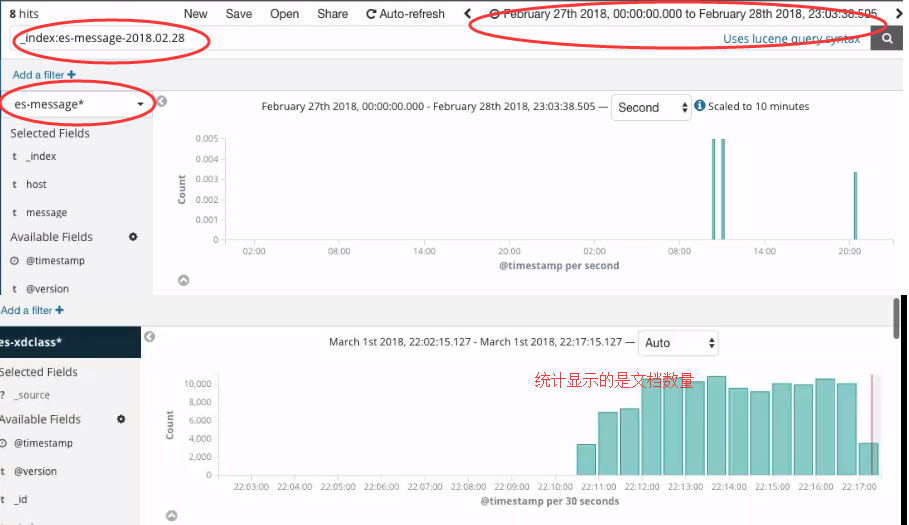
discover面板
如何查看指定索引名称的创建时间
1.命令行查询
curl -XGET http://192.168.80.10:9200/zhouls/_settings?pretty
{
"zhouls" : {
"settings" : {
"index" : {
"creation_date" : "1488203759467", //表示索引的创建时间
"uuid" : "Sppm-db_Qm-OHptOC7vznw",
"number_of_replicas" : "1",
"number_of_shards" : "5",
"version" : {
"created" : "2040399"
}
}
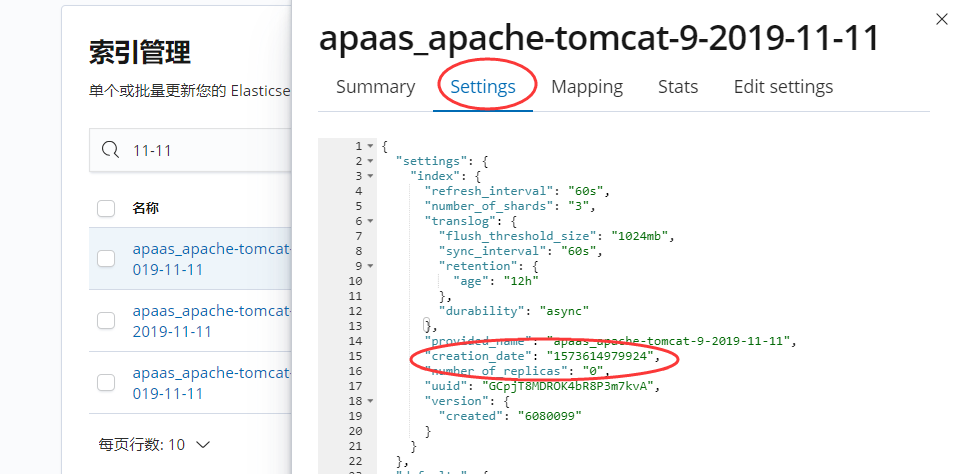
2.通过kibana查看索引的创建时间