
I suspect this isn't possible, given the nature of Android, but is there a way to create a view of sorts (perhaps using a Canvas object?) that is shown on top of all applications?
My intent for this project is not malicious. I have created some simple Color Filter software for Windows that simply adds a window on top of all windows, which is filled with a user-chosen color, and has a low opacity. This adds a light tint to the screen which helps users with Scoptopic Sensitivity Syndrome use a computer for long periods of time. I would like to make an Android version of this software. For example:
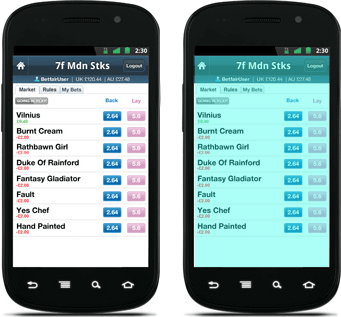
The image on the left is the original, and the one on the right is what I am trying to achieve.
Is there any way at all to do this with Android? I understand that the application will have to run as a system service so that it isn't stopped unexpectedly, but to my knowledge, there is no way to generically draw on the screen on top of other applications. If possible, can you suggest what APIs to look into?
Here is what I think may work:
You will need the following values:
Red, Green, Blue, Alpha and Contrast (r,g,b,a,c)
Store them in a preference after using sliders:
  private SharedPreferences pref;
  //In onCreate..
  this.pref = getSharedPreferences("pref", 0);
  //Method to save the values in Preferences
  private void save()
  {
    SharedPreferences.Editor localEditor = this.pref.edit();
    localEditor.putInt("a", this.a);
    localEditor.putInt("r", this.r);
    localEditor.putInt("g", this.g);
    localEditor.putInt("b", this.b);
    localEditor.putInt("c", this.c);
    localEditor.commit();
  }
Define a Layer Class which extends the view and is used to draw the applied values on the canvas.
import android.view.View;
import android.graphics.Canvas;
import android.content.Context;

public class Layer extends View
{
  private int a;
  private int b;
  private int g;
  private int r;

  public Layer(Context context){
    super(context)
  }

  protected void onDraw(Canvas canvas){
    super.onDraw(canvas);
    canvas.drawARGB(this.a, this.r, this.g, this.b);
  }

  public void setColor(int a, int r, int g, int b){
    this.a = a;
    this.r = r;
    this.g = g;
    this.b = b;
    invalidate();
  }
}
Next write a service which is supposed to handle the changes in these values and apply them to the windows.
public class ScreenAdjustService extends Service
{
     //Handle everything here
}
//Declare views for applying the values that are stored in Prefs private static Layer view; ... public static int r; public static int b; public static int g; public static int a; public static int c;
In the onCreate method,
Get values previously stored in preferences,
SharedPreferences localSharedPreferences = getSharedPreferences("pref", 0);
a = localSharedPreferences.getInt("a", 0);
r = localSharedPreferences.getInt("r", 0);
g = localSharedPreferences.getInt("g", 0);
b = localSharedPreferences.getInt("b", 0);
c = localSharedPreferences.getInt("c", 0);
set views for setting the retrieved values,
view = new Layer(this);
redView = new Layer(this);
...
Add these views to the window
//Pass the necessary values for localLayoutParams
WindowManager.LayoutParams localLayoutParams = new WindowManager.LayoutParams(...);
WindowManager localWindowManager = (WindowManager)getSystemService("window");
localWindowManager.addView(view, localLayoutParams);
localWindowManager.addView(redView, localLayoutParams);
localWindowManager.addView(greenView, localLayoutParams);
Write reusable methods
public static void setAlpha(int alpha){
        //Handle all conditions
        view.setColor(alpha, 0, 0, 0);
}
public static void setContrast(int contrast){
    //Handle all conditions
    view.setColor(c, 100, 100, 100);
}

public static void setRGB(int r, int g, int b){
    //Handle all conditions
    redView.setColor(r, 255, 0, 0);
    greenView.setColor(g, 0, 255, 0);
    blueView.setColor(b, 0, 0, 255);
}
Call these methods wherever necessary using the service class
ScreenAdjustService.setRGB(MyActivity.this.r, MyActivity.this.g, MyActivity.this.b);
ScreenAdjustService.setAlpha(MyActivity.this.a);
ScreenAdjustService.setContrast(MyActivity.this.c);
Don't forget to declare your service in the Manifest xml file
<service android:name=".ScreenAdjustService " />
I might have missed a thing or two as I did this on the fly, but I think this should do it.
来源:https://stackoverflow.com/questions/13391604/draw-an-android-canvas-on-top-of-all-applications