
I'm trying to add UICollectionView to ViewController, and I need to have 3 cells 'per row' without blank space between cells (it should look like a grid). Cell width should be one third of screen size, so I thought that the layout.item width should be the same. But then I get this:
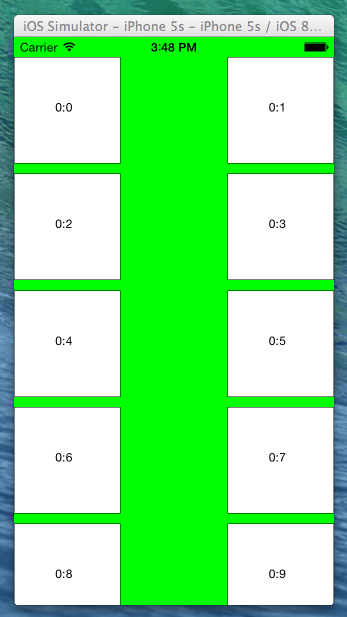
If I reduce that size (by 7 or 8 pixels e.g.), it's better, but the third cell in row is not completely visible, and I still have that blank space (top & bottom, and left & right) .

class ViewController: UIViewController, UICollectionViewDelegateFlowLayout, UICollectionViewDataSource {
    var collectionView: UICollectionView?
    var screenSize: CGRect!
    var screenWidth: CGFloat!
    var screenHeight: CGFloat!

    override func viewDidLoad() {
        super.viewDidLoad()

        screenSize = UIScreen.mainScreen().bounds
        screenWidth = screenSize.width
        screenHeight = screenSize.height

        // Do any additional setup after loading the view, typically from a nib
        let layout: UICollectionViewFlowLayout = UICollectionViewFlowLayout()
        layout.sectionInset = UIEdgeInsets(top: 20, left: 0, bottom: 10, right: 0)
        layout.itemSize = CGSize(width: screenWidth / 3, height: screenWidth / 3)
        collectionView = UICollectionView(frame: self.view.frame, collectionViewLayout: layout)
        collectionView!.dataSource = self
        collectionView!.delegate = self
        collectionView!.registerClass(CollectionViewCell.self, forCellWithReuseIdentifier: "CollectionViewCell")
        collectionView!.backgroundColor = UIColor.greenColor()
        self.view.addSubview(collectionView!)
    }

    func numberOfSectionsInCollectionView(collectionView: UICollectionView) -> Int {
        return 1
    }

    func collectionView(collectionView: UICollectionView, numberOfItemsInSection section: Int) -> Int {
        return 20
    }

    func collectionView(collectionView: UICollectionView, cellForItemAtIndexPath indexPath: NSIndexPath) -> UICollectionViewCell {
        let cell = collectionView.dequeueReusableCellWithReuseIdentifier("CollectionViewCell", forIndexPath: indexPath) as CollectionViewCell
        cell.backgroundColor = UIColor.whiteColor()
        cell.layer.borderColor = UIColor.blackColor().CGColor
        cell.layer.borderWidth = 0.5
        cell.frame.size.width = screenWidth / 3
        cell.frame.size.height = screenWidth / 3

        cell.textLabel?.text = "\(indexPath.section):\(indexPath.row)"
        return cell
    }
}
Add these 2 lines
layout.minimumInteritemSpacing = 0
layout.minimumLineSpacing = 0
So you have:
   // Do any additional setup after loading the view, typically from a nib.
        let layout: UICollectionViewFlowLayout = UICollectionViewFlowLayout()
        layout.sectionInset = UIEdgeInsets(top: 20, left: 0, bottom: 10, right: 0)
        layout.itemSize = CGSize(width: screenWidth/3, height: screenWidth/3)
        layout.minimumInteritemSpacing = 0
        layout.minimumLineSpacing = 0
        collectionView!.collectionViewLayout = layout
That will remove all the spaces and give you a grid layout:

If you want the first column to have a width equal to the screen width then add the following function:
func collectionView(collectionView: UICollectionView, layout collectionViewLayout: UICollectionViewLayout, sizeForItemAtIndexPath indexPath: NSIndexPath) -> CGSize {
    if indexPath.row == 0
    {
        return CGSize(width: screenWidth, height: screenWidth/3)
    }
    return CGSize(width: screenWidth/3, height: screenWidth/3);

}
Grid layout will now look like (I've also added a blue background to first cell):

For Swift 3 and XCode 8, this worked. Follow below steps to achieve this:-
{
    let layout: UICollectionViewFlowLayout = UICollectionViewFlowLayout()
    let width = UIScreen.main.bounds.width
    layout.sectionInset = UIEdgeInsets(top: 0, left: 5, bottom: 0, right: 5)
    layout.itemSize = CGSize(width: width / 2, height: width / 2)
    layout.minimumInteritemSpacing = 0
    layout.minimumLineSpacing = 0
    collectionView!.collectionViewLayout = layout
}
Place this code into viewDidLoad() function.
In Certain situations, Setting the UICollectionViewFlowLayout in viewDidLoador ViewWillAppear may not effect on the collectionView.
Setting the UICollectionViewFlowLayout in viewDidAppear may cause see the changes of the cells sizes in runtime.
Another Solution, in Swift 3 :
extension YourViewController : UICollectionViewDelegateFlowLayout{

    func collectionView(_ collectionView: UICollectionView, layout collectionViewLayout: UICollectionViewLayout, insetForSectionAt section: Int) -> UIEdgeInsets {
        return UIEdgeInsets(top: 20, left: 0, bottom: 10, right: 0)
    }

    func collectionView(_ collectionView: UICollectionView, layout collectionViewLayout: UICollectionViewLayout, sizeForItemAt indexPath: IndexPath) -> CGSize {
        let collectionViewWidth = collectionView.bounds.width
        return CGSize(width: collectionViewWidth/3, height: collectionViewWidth/3)
    }

    func collectionView(_ collectionView: UICollectionView, layout collectionViewLayout: UICollectionViewLayout, minimumInteritemSpacingForSectionAt section: Int) -> CGFloat {
        return 0
    }
    func collectionView(_ collectionView: UICollectionView, layout collectionViewLayout: UICollectionViewLayout, minimumLineSpacingForSectionAt section: Int) -> CGFloat {
        return 20
    }
}
If you are looking for Swift 3, Follow the steps to achieve this:
func viewDidLoad() {

    //Define Layout here
    let layout: UICollectionViewFlowLayout = UICollectionViewFlowLayout()

    //Get device width
    let width = UIScreen.main.bounds.width

    //set section inset as per your requirement.
    layout.sectionInset = UIEdgeInsets(top: 0, left: 5, bottom: 0, right: 5)

    //set cell item size here
    layout.itemSize = CGSize(width: width / 2, height: width / 2)

    //set Minimum spacing between 2 items
    layout.minimumInteritemSpacing = 0

    //set minimum vertical line spacing here between two lines in collectionview
    layout.minimumLineSpacing = 0

    //apply defined layout to collectionview
    collectionView!.collectionViewLayout = layout

}
This is verified on Xcode 8.0 with Swift 3.
let layout = myCollectionView.collectionViewLayout as? UICollectionViewFlowLayout
layout?.minimumLineSpacing = 8
Swift 4
let collectionViewLayout = collectionView.collectionViewLayout as? UICollectionViewFlowLayout
collectionViewLayout?.sectionInset = UIEdgeInsetsMake(0, 20, 0, 40)
collectionViewLayout?.invalidateLayout()
For Swift 3 and XCode 8, this worked. Follow below steps to achieve this:-
viewDidLoad()
    {
        let layout: UICollectionViewFlowLayout = UICollectionViewFlowLayout()
        var width = UIScreen.main.bounds.width
        layout.sectionInset = UIEdgeInsets(top: 0, left: 5, bottom: 0, right: 5)
    width = width - 10
    layout.itemSize = CGSize(width: width / 2, height: width / 2)
        layout.minimumInteritemSpacing = 0
        layout.minimumLineSpacing = 0
        collectionView!.collectionViewLayout = layout
    }
For Swift 3+ and Xcode 9+ Try using this
extension ViewController: UICollectionViewDelegateFlowLayout {

func collectionView(_ collectionView: UICollectionView, layout collectionViewLayout: UICollectionViewLayout, sizeForItemAt indexPath: IndexPath) -> CGSize {

    let collectionWidth = collectionView.bounds.width
    return CGSize(width: collectionWidth/3, height: collectionWidth/3)

}

func collectionView(_ collectionView: UICollectionView, layout collectionViewLayout: UICollectionViewLayout, minimumLineSpacingForSectionAt section: Int) -> CGFloat {
    return 0
}

func collectionView(_ collectionView: UICollectionView, layout collectionViewLayout: UICollectionViewLayout, minimumInteritemSpacingForSectionAt section: Int) -> CGFloat {
    return 0

}
来源:https://stackoverflow.com/questions/28325277/how-to-set-cell-spacing-and-uicollectionview-uicollectionviewflowlayout-size-r