
说明:
1Demo001Application,spring boot
2resourceapplication.properties,Spring boot
3testDemo001ApplicationTestsspring boot
4pom.xml
1 <?xml version="1.0" encoding="UTF-8"?> 2 <project xmlns="http://maven.apache.org/POM/4.0.0" xmlns:xsi="http://www.w3.org/2001/XMLSchema-instance" 3 xsi:schemaLocation="http://maven.apache.org/POM/4.0.0 http://maven.apache.org/xsd/maven-4.0.0.xsd"> 4 <modelVersion>4.0.0</modelVersion> 5 <groupId>com.wf</groupId> 6 <artifactId>demo001</artifactId> 7 <version>1.0</version> 8 <packaging>jar</packaging> 9 10 <name>demo001</name> 11 <description>Demo project for Spring Boot</description> 12 13 <parent> 14 <groupId>org.springframework.boot</groupId> 15 <artifactId>spring-boot-starter-parent</artifactId> 16 <version>2.0.4.RELEASE</version> 17 <relativePath/> <!-- lookup parent from repository --> 18 </parent> 19 20 <properties> 21 <project.build.sourceEncoding>UTF-8</project.build.sourceEncoding> 22 <project.reporting.outputEncoding>UTF-8</project.reporting.outputEncoding> 23 <java.version>1.8</java.version> 24 </properties> 25 26 <dependencies> 27 <dependency> 28 <groupId>org.springframework.boot</groupId> 29 <artifactId>spring-boot-starter-web</artifactId> 30 </dependency> 31 32 <dependency> 33 <groupId>org.springframework.boot</groupId> 34 <artifactId>spring-boot-starter-test</artifactId> 35 <scope>test</scope> 36 </dependency> 37 </dependencies> 38 39 <build> 40 <plugins> 41 <plugin> 42 <groupId>org.springframework.boot</groupId> 43 <artifactId>spring-boot-maven-plugin</artifactId> 44 </plugin> 45 </plugins> 46 </build> 47 48 49 </project>
注意观察
spring-boot-starter-parent,,spring-boot-starter-web webspring-boot-starter-test spring boot
mavenmavenSpringboot
1 <mirror> 2 3 <id>huaweicloud</id> 4 5 <mirrorOf>*</mirrorOf> 6 7 <url>https://mirrors.huaweicloud.com/repository/maven/</url> 8 9 </mirror>
启动项目
spring boot,Demo001Application-->RunDemoApplication
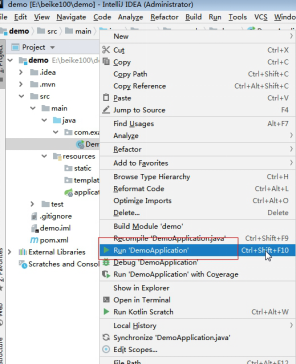
在控制台出现如下输出:
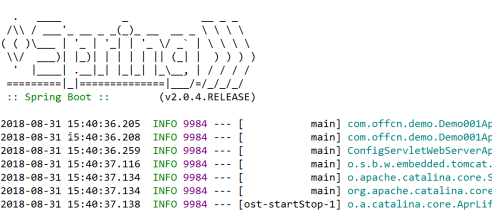
SpringBoot
tomcat8080http,1.832
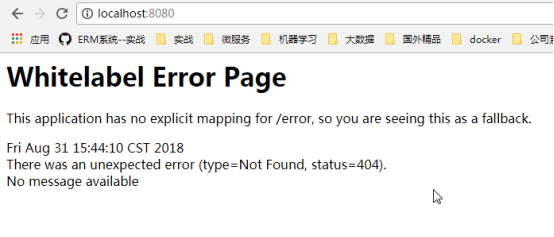
404,
HelloController
1 package com.wf.demo.controller; 2 3 import org.springframework.stereotype.Controller; 4 import org.springframework.web.bind.annotation.RequestMapping; 5 import org.springframework.web.bind.annotation.RequestMethod; 6 import org.springframework.web.bind.annotation.ResponseBody; 7 8 @Controller 9 public class HelloController { 10 11 @RequestMapping(value="/hello",method=RequestMethod.GET) 12 @ResponseBody 13 public String sayHello() { 14 return "hello spring Boot!"; 15 } 16 } HelloControllercom.offcn.demo。
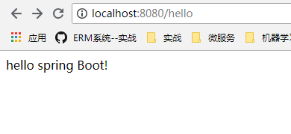
重启应用,看控制台输出:

hello
来源:博客园
作者:互联网蜜蜂
链接:https://www.cnblogs.com/wufeng6/p/11795848.html