
一、场景:类与类之间的消息通信,例如创建一个对象前后做拦截,日志等等相应的事件处理。
二、事件监听步骤
(1)自定义事件继承ApplicationEvent抽象类
(2)自定义事件监听器,一般实现ApplicationListener接口
(3)配置监听器,启动时,需要把监听器加入到spring容器中(见实现方式)
(4)事件发布
三、实现方式
1、手动实现方式 --> 手动把事件监听类添加的SpringBoot容器中
addListeners方法
注解@Component --> 事件监听类添加@Component
3、通过配置信息
4、在事件处理类注解@EventListener(MyApplicationEvent.class) --> 该方法还可以指定监听的事件(推荐
四、代码
1、建立Spring Initializr项目boot-event
代码结构
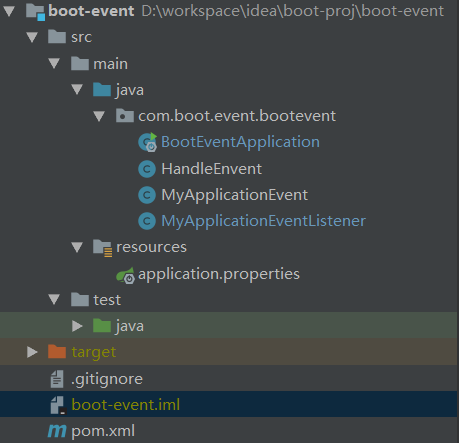
第一步 自定义事件类 MyApplicationEvent extends ApplicationEvent


1 package com.boot.event.bootevent; 2 3 import org.springframework.context.ApplicationEvent; 4 5 public class MyApplicationEvent extends ApplicationEvent { 6 public MyApplicationEvent(Object source) { 7 super(source); 8 } 9 } 第二步 自定义事件监听类
1 package com.boot.event.bootevent; 2 3 import org.springframework.context.ApplicationListener; 4 5 public class MyApplicationEventListener implements ApplicationListener<MyApplicationEvent> { 6 @Override 7 public void onApplicationEvent(MyApplicationEvent event) { 8 System.out.println("接收到了事件:" + event.getClass()); 9 } 10 } 1 package com.boot.event.bootevent; 2 3 import org.springframework.boot.SpringApplication; 4 import org.springframework.boot.autoconfigure.SpringBootApplication; 5 import org.springframework.context.ConfigurableApplicationContext; 6 7 @SpringBootApplication 8 public class BootEventApplication { 9 10 public static void main(String[] args) { 11 SpringApplication app = new SpringApplication(BootEventApplication.class); 12 13 //第一种方式:手动添加监听事 14 app.addListeners(new MyApplicationEventListener()); 15 ConfigurableApplicationContext contex = app.run(args); 16 17 //发布事件 18 contex.publishEvent(new MyApplicationEvent(new Object())); 19 contex.close(); 20 } 21 } 接收到了事件:class com.boot.event.bootevent.MyApplicationEvent
以上手动调用addListeners把事件监听添加到Sring容器中管理。
第二种方式:注解@Component --> 事件监听类添加@Component
@Component public class MyApplicationEventListener implements ApplicationListener<MyApplicationEvent> { @Override public void onApplicationEvent(MyApplicationEvent event) { System.out.println("接收到了事件:" + event.getClass()); } } 把BootEventApplication.java中main方法的addListeners注释掉
//第一种方式:手动添加监听事 //app.addListeners(new MyApplicationEventListener());
运行项目打印结果
接收到了事件:class com.boot.event.bootevent.MyApplicationEvent
可以看到自定义的事件同样被监听到
第三种方法:通过配置信息
在第二种方法的基础上继续第三种方法,首先在application.properties配置文件中添加以下配置信息
context.listener.classes=com.boot.event.bootevent.MyApplicationEventListener
同时把MyApplicationEventListener类的注解@Component注释掉,如下所示
//第二种方式:添加注解 //@Component public class MyApplicationEventListener implements ApplicationListener<MyApplicationEvent> { //...... } 打印结果
接收到了事件:class com.boot.event.bootevent.MyApplicationEvent
说明配置的方法也成功让自定义的事件监听起作用
第四中方法 也是推荐的方法-->定定义专门的事件处理类HandleEnvent.java
1 package com.boot.event.bootevent; 2 3 import org.springframework.context.event.ContextClosedEvent; 4 import org.springframework.context.event.EventListener; 5 import org.springframework.stereotype.Component; 6 7 @Component 8 public class HandleEnvent { 9 @EventListener(MyApplicationEvent.class) 10 public void handleEvent(MyApplicationEvent event) { 11 System.out.println("接收到了事件:" + event.getClass()); 12 System.out.println("接收到了事件:" + event.getSource()); 13 } 14 15 @EventListener(ContextClosedEvent.class) 16 public void handleEvent(Object event) { 17 System.out.println("接收到了事件:" + event.getClass()); 18 } 19 } 把第三中方法中的配置信息注释掉,其他不变
#context.listener.classes=com.boot.event.bootevent.MyApplicationEventListener
打印结果
接收到了事件:class com.boot.event.bootevent.MyApplicationEvent 接收到了事件:java.lang.Object@1c4ee95c 接收到了事件:class org.springframework.context.event.ContextClosedEvent