
背景
前段时间,根据需求,要将项目烧入到芯片,但我的擅长之处就是前后端分离开发,因此需要前端vue开发好,打包放到后端里面一起执行。那时候碰到好多貌似不可逾越的坑,今天终于可以抽出点时间,记录一下过程笔记。
vue-cli打包之前的配置
脚手架创建会生成如下的目录: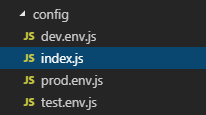
- 首先我们先把vue路由里的#去掉
只需在router里面加如下代码:
- 配置build文件夹下的index.js
build: { // Template for index.html index: path.resolve(__dirname, '../../static/public/index.html'), // Paths assetsRoot: path.resolve(__dirname, '../../static/public'), assetsSubDirectory: 'static', assetsPublicPath: '/后端的context-path值/public/', /** * Source Maps */ productionSourceMap: false, // https://webpack.js.org/configuration/devtool/#production devtool: 'source-map', // Gzip off by default as many popular static hosts such as // Surge or Netlify already gzip all static assets for you. // Before setting to `true`, make sure to: // npm install --save-dev compression-webpack-plugin productionGzip: false, productionGzipExtensions: ['js', 'css'], // Run the build command with an extra argument to // View the bundle analyzer report after build finishes: // `npm run build --report` // Set to `true` or `false` to always turn it on or off bundleAnalyzerReport: process.env.npm_config_report } - 执行npm run build打包
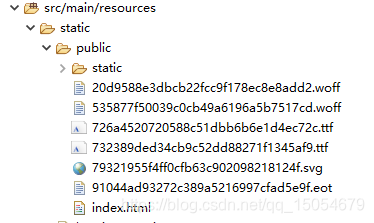
生成的包在项目根目录里的static文件夹下,直接把它拷贝到spring boot后台如下图即可
- 启动后台并浏览器访问
启动后台后,在浏览器里输入http://ip:端口号/项目名/static/public/index.html/index,如此大功告成。
总结
主要时build模块那里配置跟boot的指定的文件一致的,就可以访问到,有时候你会发现访问不到html,那是因为被boot拦截了。还有就是vue接口跨域的问题,最后交由后端来处理,尽量的使用prodEnv里面的变量。
文章来源: https://blog.csdn.net/qq_15054679/article/details/90692578