
java中偶尔会出现需要将一张小图片嵌入大图中或带二维码的海报图片,那么本文就是奔着这个目的来的,直接上腊肉!
zxing是生成1D和2D条形或二维码的工具类库,java图形库Graphics2D进行图片的合成。
依赖:
<dependency>
    <groupId>com.google.zxing</groupId>
    <artifactId>core</artifactId>
    <version>3.3.3</version>
</dependency>
代码:
以下为合成图片和二维码,合成2张图片参看第一个方法注释掉的代码
/*
 * overlapImage
 * @description:合成二维码和图片为文件
 * @author 李阳
 * @date 2018/12/13
 * @params [backPicPath, code]
 * @return void
 */
public static final void combineCodeAndPicToFile(String backPicPath, BufferedImage code/*String fillPicPath*/) {
    try {
        BufferedImage big = ImageIO.read(new File(backPicPath));
        BufferedImage small = code;
        /*//合成两个文件时使用
        BufferedImage small = ImageIO.read(new File(fillPicPath));*/
        Graphics2D g = big.createGraphics();

        //二维码或小图在大图的左上角坐标
        int x = (big.getWidth() - small.getWidth()) / 2;
        // int y = (big.getHeight() - small.getHeight()) / 2;
        int y = (big.getHeight() - small.getHeight() - 100);
        g.drawImage(small, x, y, small.getWidth(), small.getHeight(), null);
        g.dispose();
        //为了保证大图背景不变色,formatName必须为"png"
        ImageIO.write(big, "png", new File("C:/Users/kevin/Desktop/combinePic.jpg"));
    } catch (Exception e) {
        e.printStackTrace();
    }
}

/*
 * combineCodeAndPicToInputstream
 * @description:合成二维码和图片为输出流,可用于下载或直接展示
 * @author 李阳
 * @date 2018/12/13
 * @params [backPicPath, code]
 * @return java.io.InputStream
 */
public static final void combineCodeAndPicToInputstream(String backPicPath, BufferedImage code, HttpServletResponse resp) {
    try {
        BufferedImage big = ImageIO.read(new File(backPicPath));
        // BufferedImage small = ImageIO.read(new File(fillPicPath));
        BufferedImage small = code;
        Graphics2D g = big.createGraphics();

        //二维码或小图在大图的左上角坐标
        int x = (big.getWidth() - small.getWidth()) / 2;
        int y = (big.getHeight() - small.getHeight() - 100);   //二维码距大图下边距100
        g.drawImage(small, x, y, small.getWidth(), small.getHeight(), null);
        g.dispose();
        resp.addHeader("Content-Disposition", "attachment;filename="+ URLEncoder.encode("lia阿里.png","UTF-8") );//去掉这行设置header的代码,前端访问可以直接展示
        //为了保证大图背景不变色,formatName必须为"png"
        ImageIO.write(big, "png", resp.getOutputStream());
    } catch (Exception e) {
        e.printStackTrace();
    }
}
/*
 * combineCodeAndPicToBase64
 * @description:合成二维码和图片为Base64,同样可用于直接展示
 * @author 李阳
 * @date 2018/12/14
 * @params [backPicPath, code]
 * @return java.lang.String
 */
public static final String combineCodeAndPicToBase64(String backPicPath, BufferedImage code) {
    ImageOutputStream imOut = null;
    try {
        BufferedImage big = ImageIO.read(new File(backPicPath));
        // BufferedImage small = ImageIO.read(new File(fillPicPath));
        BufferedImage small = code;
        Graphics2D g = big.createGraphics();

        //二维码或小图在大图的左上角坐标
        int x = (big.getWidth() - small.getWidth()) / 2;
        int y = (big.getHeight() - small.getHeight() - 100);
        g.drawImage(small, x, y, small.getWidth(), small.getHeight(), null);
        g.dispose();
        //为了保证大图背景不变色,formatName必须为"png"

        ByteArrayOutputStream bs = new ByteArrayOutputStream();
        imOut = ImageIO.createImageOutputStream(bs);
        ImageIO.write(big, "png", imOut);
        InputStream in = new ByteArrayInputStream(bs.toByteArray());

        byte[] bytes = new byte[in.available()];
        in.read(bytes);
        String base64 = Base64.getEncoder().encodeToString(bytes);
        System.out.println(base64);

        return "data:image/jpeg;base64," + base64;
    } catch (Exception e) {
        e.printStackTrace();
    }
    return null;
}

/*
 * createImage
 * @description:生成二维码
 * @author 李阳
 * @date 2018/12/13
 * @params [content 二维码内容, logoImgPath 中间logo, needCompress 是否压缩]
 * @return java.awt.image.BufferedImage
 */
private static BufferedImage createImage(String content, String logoImgPath, boolean needCompress) throws IOException, WriterException {
    Hashtable<EncodeHintType, Object> hints = new Hashtable<EncodeHintType, Object>();
    hints.put(EncodeHintType.ERROR_CORRECTION, ErrorCorrectionLevel.H);
    hints.put(EncodeHintType.CHARACTER_SET, CHARSET);
    hints.put(EncodeHintType.MARGIN, 1);
    //200是定义的二维码或小图片的大小
    BitMatrix bitMatrix = new MultiFormatWriter().encode(content, BarcodeFormat.QR_CODE, 200, 200, hints);
    int width = bitMatrix.getWidth();
    int height = bitMatrix.getHeight();
    BufferedImage image = new BufferedImage(width, height, BufferedImage.TYPE_INT_RGB);
    //循环遍历每一个像素点
    for (int x = 0; x < width; x++) {
        for (int y = 0; y < height; y++) {
            image.setRGB(x, y, bitMatrix.get(x, y) ? 0xFF000000 : 0xFFFFFFFF);
        }
    }
    // 没有logo
    if (logoImgPath == null || "".equals(logoImgPath)) {
        return image;
    }

    // 插入logo
    insertImage(image, logoImgPath, needCompress);
    return image;
}

/*
 * insertImage
 * @description:二维码插入logo
 * @author 李阳
 * @date 2018/12/13
 * @params [source, logoImgPath, needCompress]
 * @return void
 */
private static void insertImage(BufferedImage source, String logoImgPath, boolean needCompress) throws IOException {
    File file = new File(logoImgPath);
    if (!file.exists()) {
        return;
    }

    Image src = ImageIO.read(new File(logoImgPath));
    int width = src.getWidth(null);
    int height = src.getHeight(null);
    //处理logo
    if (needCompress) {
        if (width > WIDTH) {
            width = WIDTH;
        }

        if (height > HEIGHT) {
            height = HEIGHT;
        }

        Image image = src.getScaledInstance(width, height, Image.SCALE_SMOOTH);
        BufferedImage tag = new BufferedImage(width, height, BufferedImage.TYPE_INT_RGB);
        Graphics gMaker = tag.getGraphics();
        gMaker.drawImage(image, 0, 0, null); // 绘制缩小后的图
        gMaker.dispose();
        src = image;
    }

    // 在中心位置插入logo
    Graphics2D graph = source.createGraphics();
    int x = (200 - width) / 2;
    int y = (200 - height) / 2;
    graph.drawImage(src, x, y, width, height, null);
    Shape shape = new RoundRectangle2D.Float(x, y, width, width, 6, 6);
    graph.setStroke(new BasicStroke(3f));
    graph.draw(shape);
    graph.dispose();
}

public static final void main(String[] args) throws IOException, WriterException {
    BufferedImage code = createImage("https://my.oschina.net/kevin2kelly", null, false);
    combineCodeAndPicToFile("C:/Users/kevin/Desktop/无标题.png", code);
    combineCodeAndPicToBase64("C:/Users/kevin/Desktop/无标题.png", code);
}
填充图片:
背景图和合成图片:
图一为原始背景图,第二图为base64在浏览器访问效果,三为2张图合成,四图为图片和二维码合成。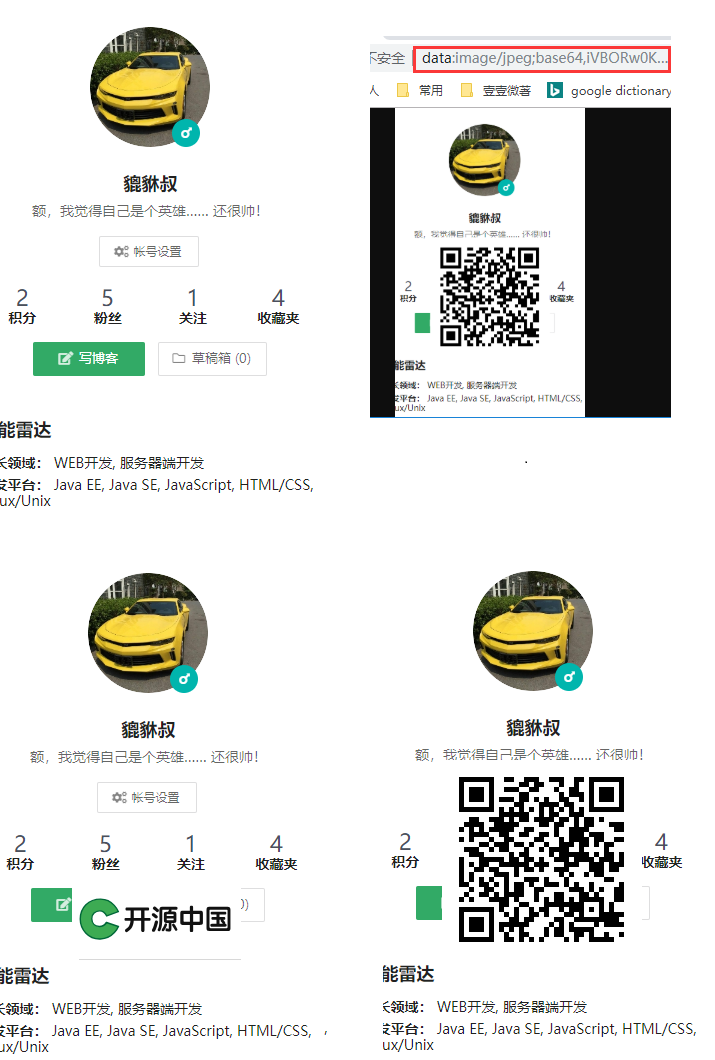
参考:
http://www.zhaochengquan.com/2018/03/29/%E5%9F%BA%E4%BA%8EZXing%E7%9A%84%E4%BA%8C%E7%BB%B4%E7%A0%81%E8%87%AA%E5%8A%A8%E7%94%9F%E6%88%90%E4%B8%8E%E5%9B%BE%E7%89%87%E5%90%88%E6%88%90/
https://blog.csdn.net/qq_35971258/article/details/80593500
来源:oschina
链接:https://my.oschina.net/u/2757387/blog/2988459